For years, a livestream player had one basic job: play the video.
It was simple: open the link, click play, watch the event. That was the whole experience people expected, with nothing more and only one language.
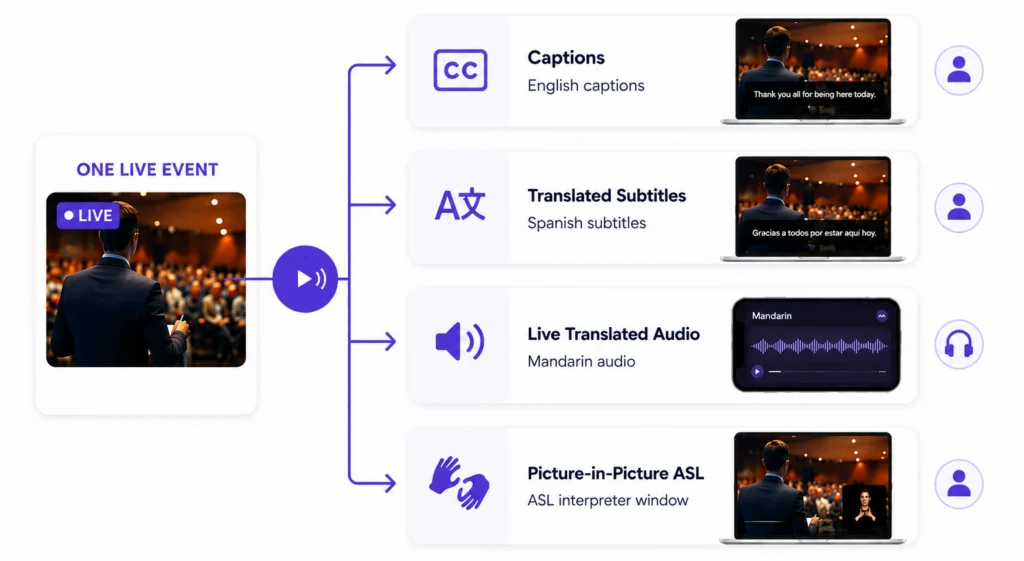
However, when accessibility and multilingual communication are built into the player, the same live event can provide an audience with so much more. During a broadcast, a modern player can:
Same event, same link, but four different ways to experience it, all chosen by the viewer.
So, what makes a streaming player accessible? What should your organization look for when choosing one?
Well, that is what this guide is all about!
Picture your event: a commencement, conference, service, or town hall. This event will reach many different people online. Do you know who is on the other end watching? What are their needs? What would make their experience easier?
Unless a survey went out ahead of time, this can be very hard to determine, but you can expect that at least one viewer will need one or more accessibility services. With an accessible player, each viewer can choose how they take in your content:
The point isn’t to include a single feature. It’s to offer multiple options and allow the viewer to decide. This ensures that no one in the audience is left out.
That is what accessibility looks like when it is built in from the start rather than added as an afterthought.

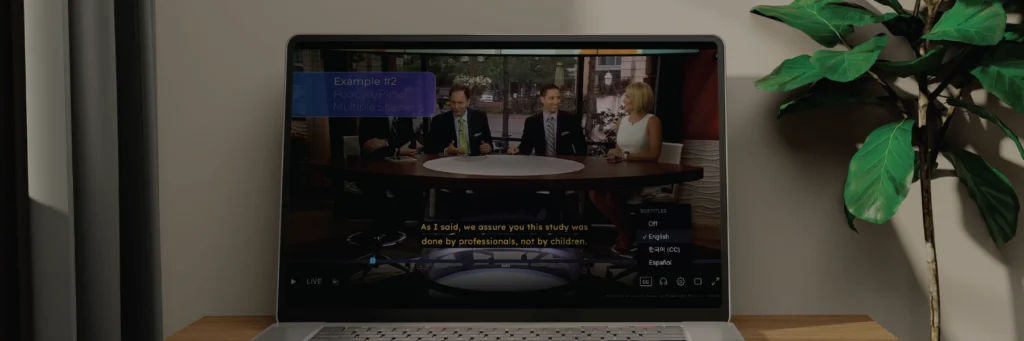
Try it for yourself. Use the controls in the player to switch between captions, subtitle languages, and translated audio. Each viewer can make their own selections while watching the same live event.
It is worth being clear about the current challenge. Many conventional streaming platforms already have accessibility and language options for recorded or on-demand (VOD) video. Viewers can experience recorded video with captions and translated audio tracks on these platforms.
Livestreaming is a different story. During a live event, many of the capabilities offered for VOD are more limited. This is the gap we aimed to bridge with an accessibility-focused player built to bring these options into the live viewing experience.
Here is a look at how a purpose-built player compares to what mainstream platforms offer during a live event:
None of these services matter if the stream itself is not dependable. Viewers need video that plays without constant buffering, captions and translated subtitles that arrive on time, and translated audio that is clear and synchronized with the event.
It is the responsibility of the streaming provider to have a reliable foundation that can continually play out the stream. On top of this foundation is a capable live player built to deliver:
Behind the scenes, the player adjusts to each viewer’s connection in real time and keeps each track locked to the same clock. Keeping video, captions, translations, and multiple audio tracks synchronized is one of the most important parts of delivering a seamless live experience. A good player handles that synchronization so the viewer never has to think about it.
If this all sounds complicated, don’t worry. The complexity of the technology stays behind the pipeline and player. At Aberdeen, we walk clients through the whole process:
Your team can stay focused on the event while we handle the work behind the scenes that makes the stream accessible.
The same livestream can be experienced in different ways. Each viewer selects the accessibility and language options that work best for them.
Here is a practical checklist if you are evaluating options. These questions are worth asking any provider and touch on everything above:
With all the engineering underneath, the viewer should never have to think about it. No one should need a technical background in adaptive bitrate streaming or audio track management to experience a graduation or service. They should simply open the link, choose the language or accessibility option that works for them, and enjoy the event.
That is the real goal: technology sophisticated enough to include everyone and simple enough that no one notices it is there.
A modern accessible livestream player lets each viewer choose their own experience during a live event. For example, one viewer can watch with English captions, another with Mandarin subtitles, another with a Spanish audio track, and another with a picture-in-picture ASL interpreter, all from the same event link.
Captions alone only meet one type of need. Real accessibility means offering multiple options at the same time, such as captions, translated subtitles, translated audio tracks, and picture-in-picture ASL, so each viewer can pick what works for them instead of everyone getting the same single feed.
Many streaming platforms already provide captions and translated audio tracks for recorded, on-demand video, but those same capabilities are much more limited during a live event. Closing this gap between live and recorded video accessibility is the focus of a purpose-built accessible live player.
Yes. With an accessibility-focused live player, each viewer picks their own option in real time, like a translated subtitle language, a live dubbed audio track, or a picture-in-picture ASL window, while everyone watches the same live event from the same link.
Synchronization keeps video, captions, translations, and audio tracks locked to the same clock so nothing drifts out of alignment during the event. The article identifies this as one of the hardest parts of live streaming, since keeping multiple tracks synchronized live is where many setups struggle.
It doesn't require a development team or rebuilding an existing pipeline. The article describes implementation as a normal setup process where the provider configures the needed languages and accessibility options, fits the player into the organization's current workflow, and offers support before, during, and after the event.