For years, a livestream player had one basic job: play the video.
It was simple: open the link, click play, watch the event. That was the whole experience people expected, with nothing more and only one language.
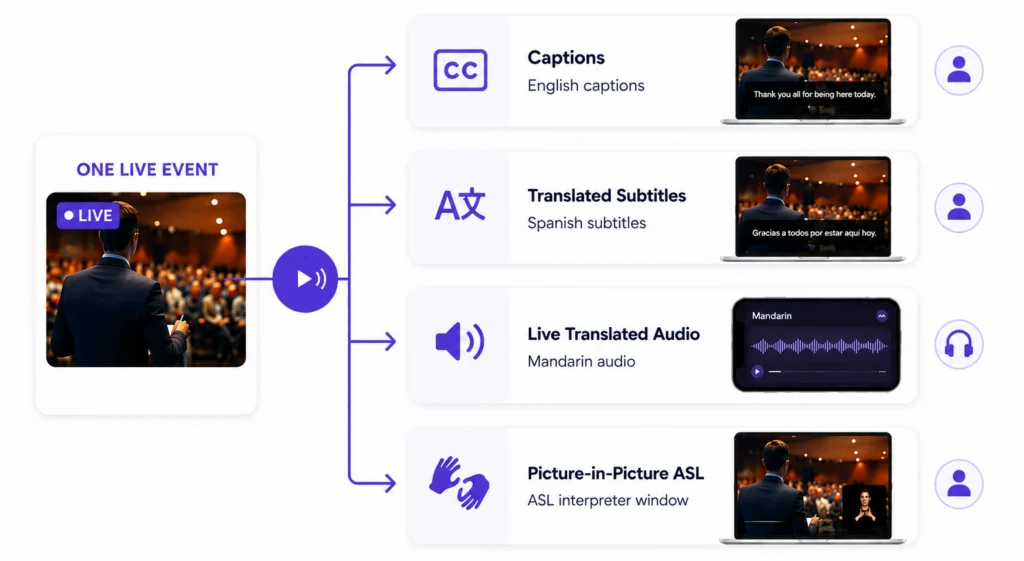
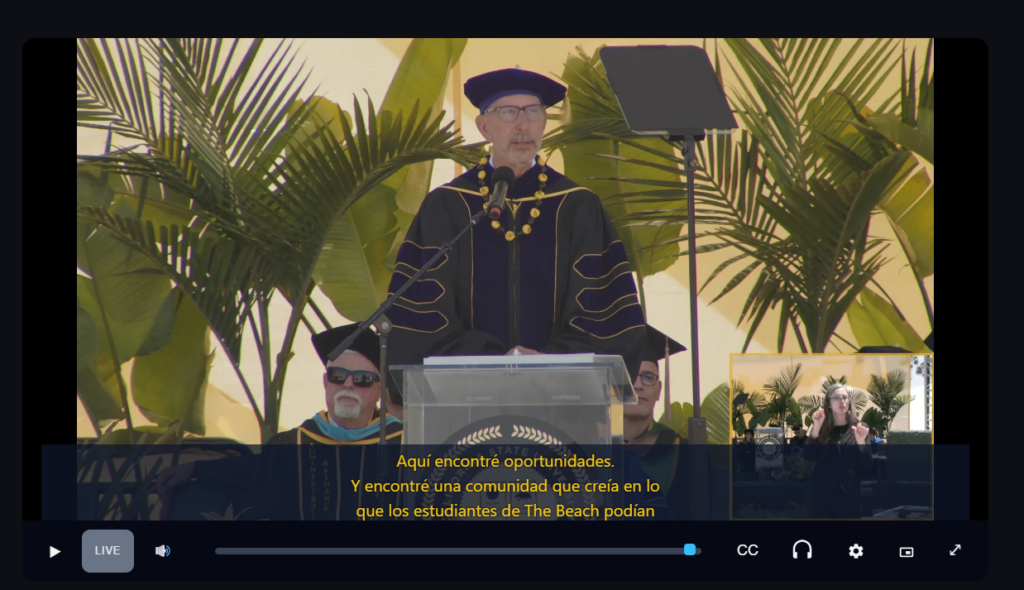
However, when accessibility and multilingual communication are built into the player, the same live event can provide an audience with so much more. During a broadcast, a modern player can:
Give a viewer English captions
Another viewer translated subtitles in Mandarin
Another viewer a Spanish audio track
And another viewer a picture-in-picture ASL interpreter
Same event, same link, but four different ways to experience it, all chosen by the viewer.
So, what makes a streaming player accessible? What should your organization look for when choosing one?
Well, that is what this guide is all about!
Does an Accessible Player Matter?
Picture your event: a commencement, conference, service, or town hall. This event will reach many different people online. Do you know who is on the other end watching? What are their needs? What would make their experience easier?
Unless a survey went out ahead of time, this can be very hard to determine, but you can expect that at least one viewer will need one or more accessibility services. With an accessible player, each viewer can choose how they take in your content:
A graduate’s grandparent turns on English captions to follow every word
An international attendee listens through a Mandarin audio track
A visiting family selects Spanish subtitles
A Deaf community member watches the picture-in-picture ASL window
The point isn’t to include a single feature. It’s to offer multiple options and allow the viewer to decide. This ensures that no one in the audience is left out.
That is what accessibility looks like when it is built in from the start rather than added as an afterthought.
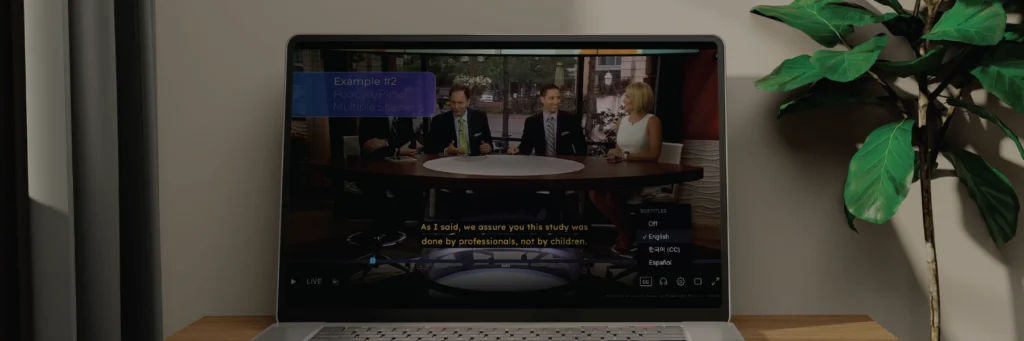
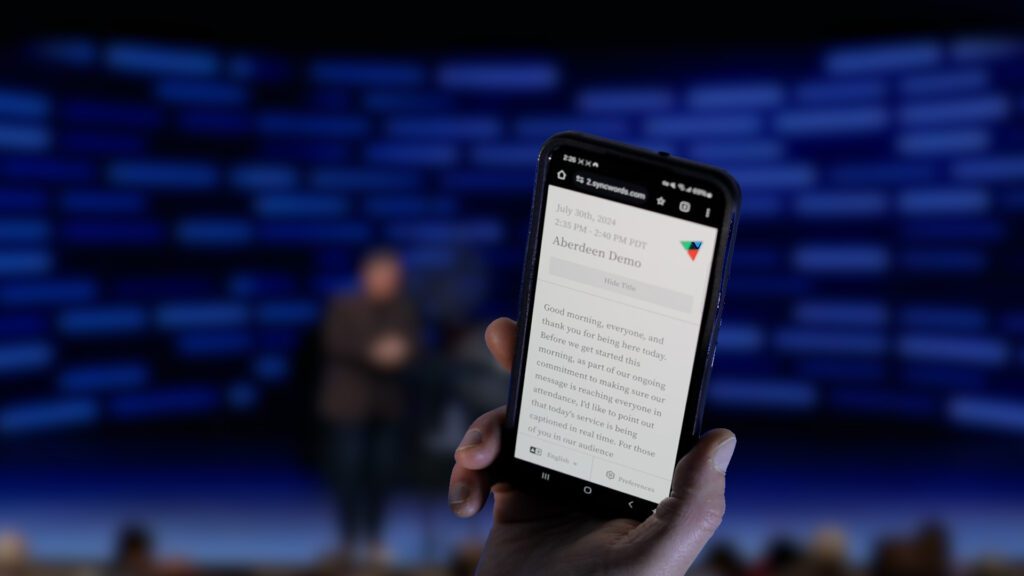
Try it for yourself. Use the controls in the player to switch between captions, subtitle languages, and translated audio. Each viewer can make their own selections while watching the same live event.
“Live” Stream – Not VOD
It is worth being clear about the current challenge. Many conventional streaming platforms already have accessibility and language options for recorded or on-demand (VOD) video. Viewers can experience recorded video with captions and translated audio tracks on these platforms.
Livestreaming is a different story. During a live event, many of the capabilities offered for VOD are more limited. This is the gap we aimed to bridge with an accessibility-focused player built to bring these options into the live viewing experience.
Here is a look at how a purpose-built player compares to what mainstream platforms offer during a live event:
Capability
Advantage
Accessibility-Focused Live Player
Mainstream
Mainstream Live Player
Live Captions
Accessibility-Focused
Yes – human or automated, embedded during the event
Mainstream
Yes (generally) – modern stacks include automated captions that vary in accuracy
Translated Subtitles
Accessibility-Focused
Yes – viewers can pick their own language live
Mainstream
No (typically) – if offered, the choices are very limited
Translated Audio Tracks (Dubbing)
Accessibility-Focused
Yes – viewers can pick their own language live
Mainstream
No – very rare if offered during a live event and accuracy varies
Picture-in-Picture ASL
Accessibility-Focused
Yes – a signing window is synced with the main video
Mainstream
No – if offered, the producer has this burned into the content
Viewer Choice
Accessibility-Focused
Yes – each viewer can select their preferred accessibility option
Mainstream
Limited – generally the same feed is served to everyone
Live Synchronization
Accessibility-Focused
Yes – video, captions, translations, and audio are all aligned
Mainstream
Varies – live synchronization across multiple tracks can be difficult
Reliability & Responsibility
None of these services matter if the stream itself is not dependable. Viewers need video that plays without constant buffering, captions and translated subtitles that arrive on time, and translated audio that is clear and synchronized with the event.
It is the responsibility of the streaming provider to have a reliable foundation that can continually play out the stream. On top of this foundation is a capable live player built to deliver:
Reliable playback that holds up from the first minute to the last
Synchronization that keeps video, captions, translations, and audio aligned
Consistent performance across both fast and slow internet connections
A dependable experience across multiple devices and operating systems
Behind the scenes, the player adjusts to each viewer’s connection in real time and keeps each track locked to the same clock. Keeping video, captions, translations, and multiple audio tracks synchronized is one of the most important parts of delivering a seamless live experience. A good player handles that synchronization so the viewer never has to think about it.
Advanced Technology ≠ Complicated Setup
If this all sounds complicated, don’t worry. The complexity of the technology stays behind the pipeline and player. At Aberdeen, we walk clients through the whole process:
Determine and configure the languages and accessibility options you need
Fit the player into your existing workflow without rebuilding your current pipeline
Complete implementation through a normal setup process, not weeks of custom development
Provide support before, during, and after your event
Keep the underlying streaming technology behind the scenes so your team does not need to understand it to implement the service
Your team can stay focused on the event while we handle the work behind the scenes that makes the stream accessible.
One Live Event, Multiple Ways to Participate
The same livestream can be experienced in different ways. Each viewer selects the accessibility and language options that work best for them.
What Should You Look for in an Accessible Streaming Player?
Here is a practical checklist if you are evaluating options. These questions are worth asking any provider and touch on everything above:
Can it support multiple live translated audio tracks at the same time?
Live dubbing in several languages at once during the event, not just after.
Can viewers choose from multiple subtitle languages?
Each viewer can choose their preferred subtitle language during the live event.
Both options should be available to support your policy and budget needs.
Can ASL be shown alongside the main video?
A picture-in-picture signing window should be built in and not burned in.
Are audio, captions, translations, and video kept in sync?
Live synchronization is where many setups struggle.
Is it easy for viewers to navigate?
Choosing a language or turning on ASL should take one tap/click.
How hard is it to implement?
It shouldn’t require a development team on your end.
What support is available before, during, and after the event?
You want a partner on call, not just a login.
Engineering Should Be Invisible to the Viewer
With all the engineering underneath, the viewer should never have to think about it. No one should need a technical background in adaptive bitrate streaming or audio track management to experience a graduation or service. They should simply open the link, choose the language or accessibility option that works for them, and enjoy the event.
That is the real goal: technology sophisticated enough to include everyone and simple enough that no one notices it is there.
Continue the Conversation
Make Your Next Livestream More Accessible
Every audience is different. Giving viewers access to captions, translated subtitles, live language audio, and ASL within the same viewing experience lets more people participate in the way that works best for them.
Talk with Aberdeen about building the right accessible livestream experience for your next event.
Accessibility is no longer an afterthought. It's becoming part of the celebration.
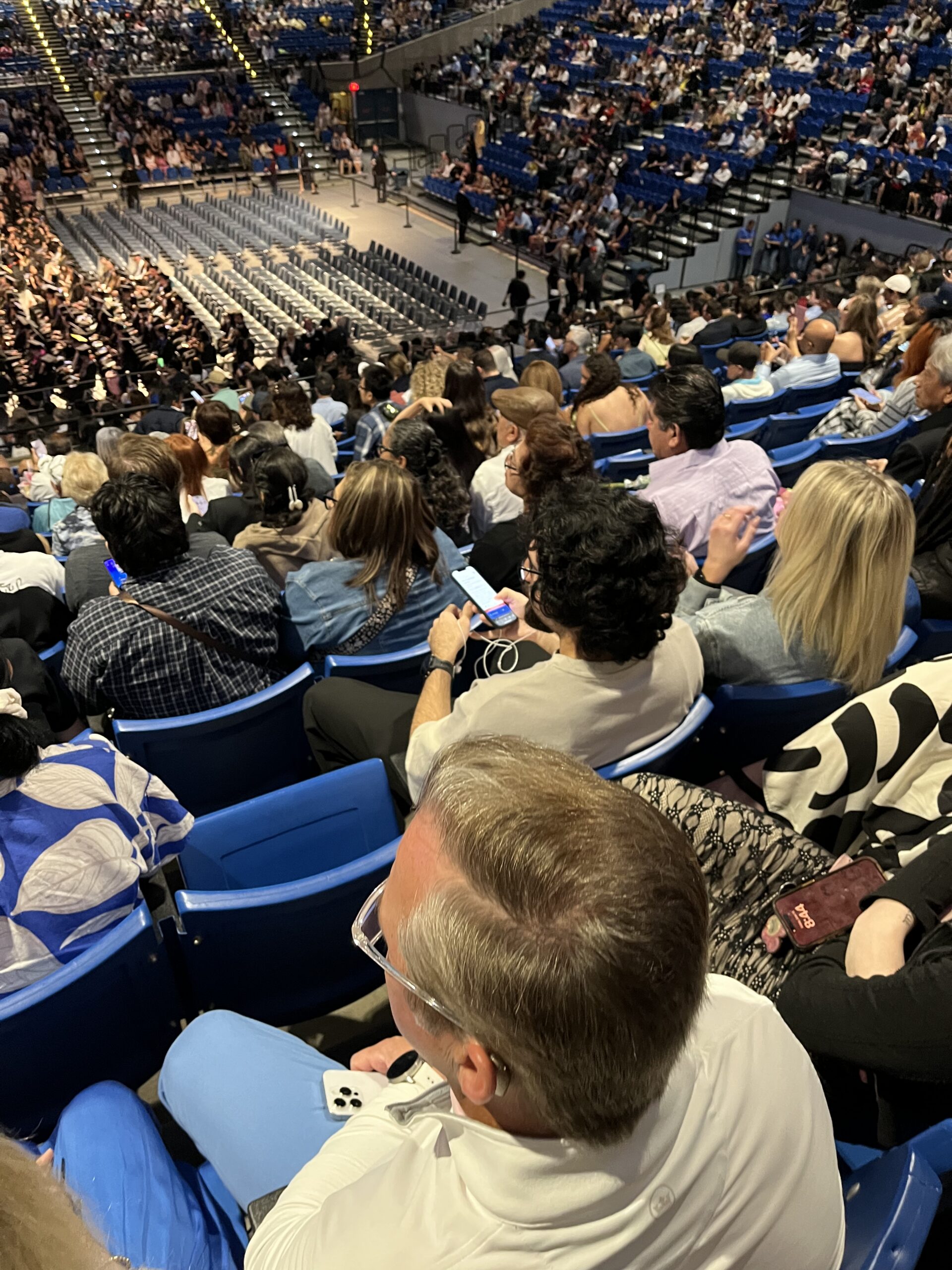
For graduates, commencement marks the culmination of years of hard work. For families, it is one of life's most meaningful milestones. Unlike a lecture or campus event, commencement is a once-in-a-lifetime celebration that cannot simply be repeated, making accessibility especially important for graduates, families, and guests.
As colleges and universities continue to expand accessibility at commencement, one trend has become increasingly clear: institutions are thinking beyond compliance and focusing on creating celebrations that every guest can experience.
During the Spring 2026 commencement season, Aberdeen supported 39 colleges and universities across the United States, providing accessibility services for 279 commencement ceremonies totaling 694 hours of live event support. While every institution approached accessibility differently, several common themes emerged that point toward the future of inclusive commencement experiences.
Commencement Accessibility Is Growing
Accessible commencement is no longer limited to a handful of institutions or a single accommodation. Compared to the previous year, universities expanded both the scale of their ceremonies and the accessibility services supporting them.
Growth across commencement seasons
Every metric grew at a broadly similar rate from 2025 to
2026 — institutions by half, ceremonies and service hours
by roughly three-quarters.
Metric
2025
2026
Growth
Institutions
26
39
+50.0%
Ceremonies
156
279
+78.8%
Service hours
395.5
694
+75.5%
Between Spring 2025 and Spring 2026:
Institutions supported grew from 26 to 39
Commencement ceremonies increased from 156 to 279
Live accessibility hours increased from 395.5 to 694
Growth wasn't concentrated within one segment of higher education. Public universities, private institutions, community colleges, faith-based universities, medical schools, and research institutions all expanded accessible commencement experiences.
Perhaps even more encouraging, 13 institutions partnered with Aberdeen for commencement for the first time, reflecting growing interest across higher education.
Rather than treating accessibility as a specialized service, many institutions are beginning to view it as a standard part of the commencement experience.
Accessibility is About Families, Not Just Students
Commencement has always celebrated student achievement, but universities increasingly recognize that these ceremonies are equally about the families, friends, and communities who supported graduates along the way.
As a result, accessibility is no longer viewed through a single lens. Some guests benefit from live English captions, while others rely on multilingual subtitles or translated audio to fully experience the ceremony. For family members unable to attend in person, livestream accessibility extends that same experience beyond the venue. Others simply find captions helpful for following along in large venues or noisy environments.
This Spring, participating institutions offered accessibility in 22 languages, reflecting the linguistic diversity of the graduates, families, and communities they serve.
Top translated languages by service hours
Languages were selected based on the needs of graduates, families, and guests.
Top translated languages by service hours
Languages were selected based on the needs of graduates,
families, and guests.
Language
Hours
Clients
Share of English hours
Spanish
324.5
21
53.0%
Chinese, Simplified
237.25
8
38.8%
Hindi
171.5
5
28.0%
Korean
166
5
27.1%
Japanese
161.5
4
26.4%
Chinese, Traditional
146.5
3
23.9%
Arabic
144.5
3
23.6%
French
124.25
2
20.3%
Portuguese
121.25
2
19.8%
Hebrew
118.25
1
19.3%
Tagalog
118.25
1
19.3%
Vietnamese
66.75
5
10.9%
Farsi/Persian
27.5
2
4.5%
German
15.5
1
2.5%
Myanmar/Burmese
15.5
1
2.5%
Kannada
12.75
1
2.1%
Tigrinya
10
1
1.6%
French Creole
5
1
0.8%
Twi/Ghanaian
3
1
0.5%
Hmong
3
1
0.5%
While Spanish remained the most frequently requested language, institutions also provided Chinese, Hindi, Korean, Japanese, Arabic, Portuguese, Tagalog, Vietnamese, Hebrew, and many others based on the needs of their graduates and families.
Rather than offering multilingual access simply because the technology exists, universities increasingly selected languages intentionally, recognizing the communities they serve.
Technology is Removing Traditional Barriers
Not long ago, the accessibility options available for commencement were often dictated by the venue. If a facility lacked captioning infrastructure, interpretation equipment, or streaming capabilities, institutions had limited flexibility in the services they could offer.
Advances in cloud-based delivery, browser-based captions, AI-powered translation, and mobile access are changing that. Today, universities have far greater control over how accessibility is delivered, both inside the venue and to guests joining remotely.
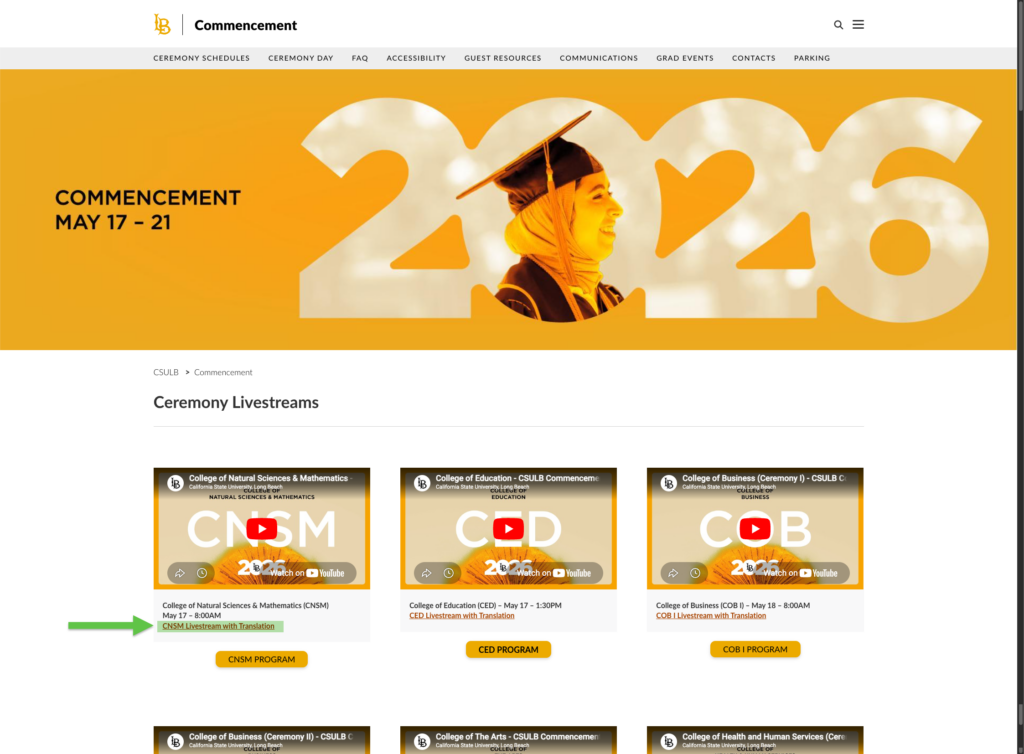
California State University, Long Beach illustrates this shift. After previously relying on venue-provided captioning services that did not meet expectations, returning commencement ceremonies to campus allowed the university to select accessibility solutions that better aligned with its goals. At the same time, the addition of a browser-based streaming player ensured that captions, multilingual subtitles, and voice translations were available to family members watching from anywhere.
Rather than being limited by the capabilities of a venue, institutions are increasingly able to design an accessibility experience that best serves their graduates, families, and guests.
Accessibility Begins Long Before the Ceremony
One of the most noticeable trends this season had nothing to do with captioning technology. It was communication.
The institutions seeing the greatest engagement treated accessibility as part of the overall guest experience, not simply as an accommodation available upon request. Rather than waiting for attendees to discover these services on their own, they introduced them before guests arrived and reinforced their availability throughout the event.
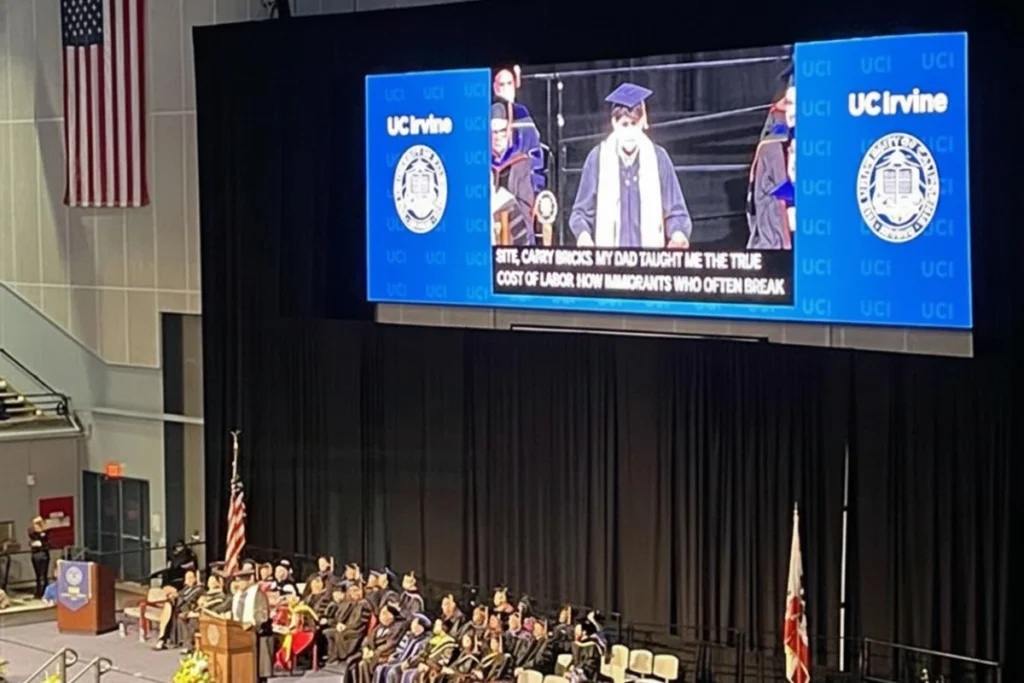
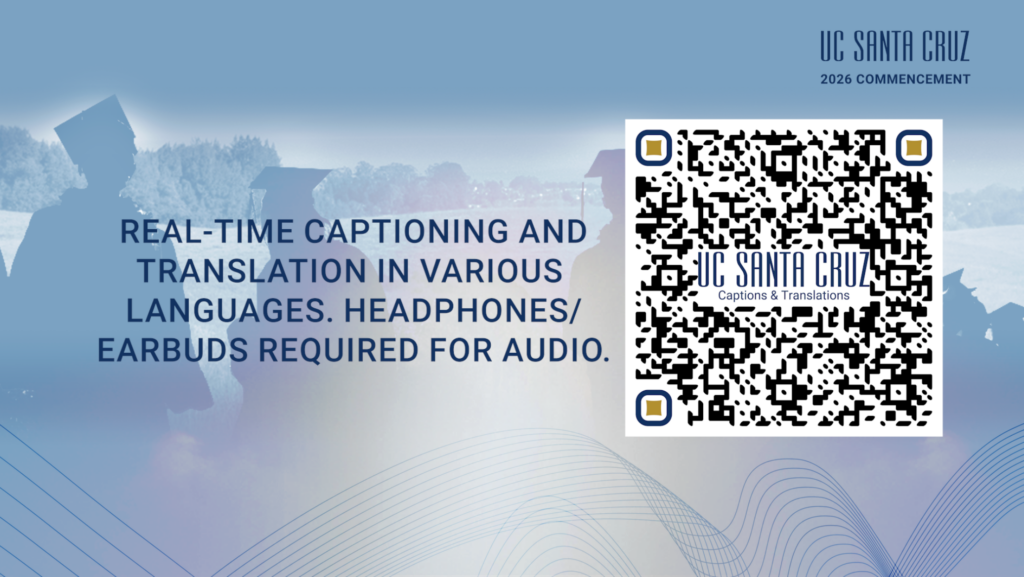
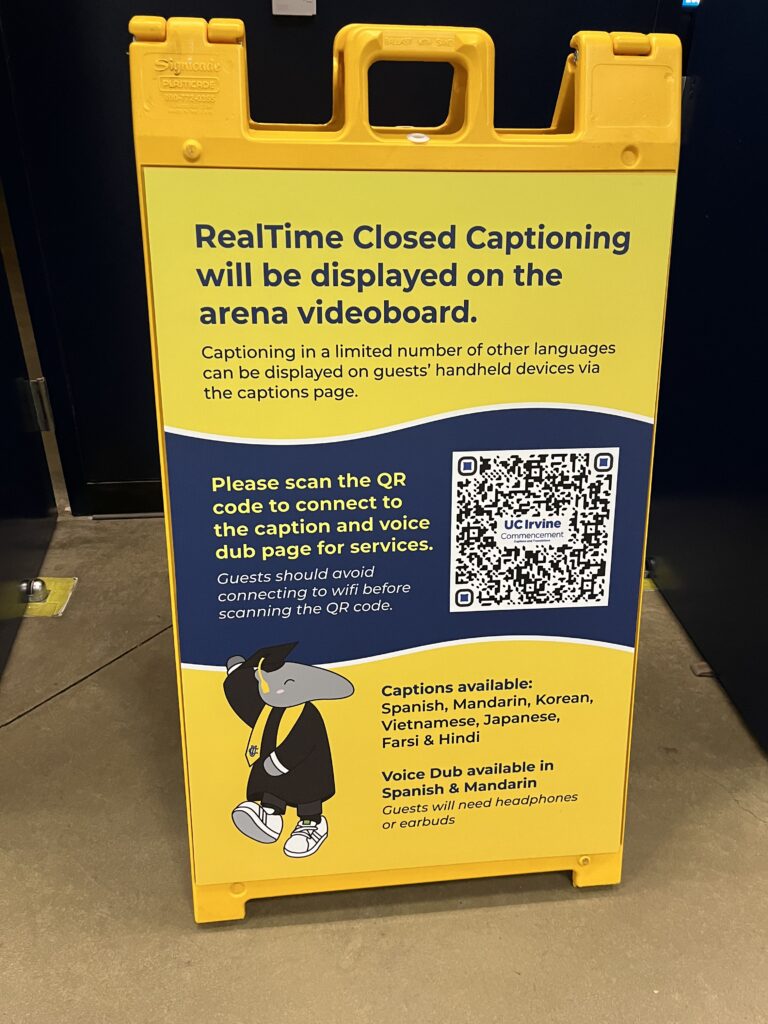
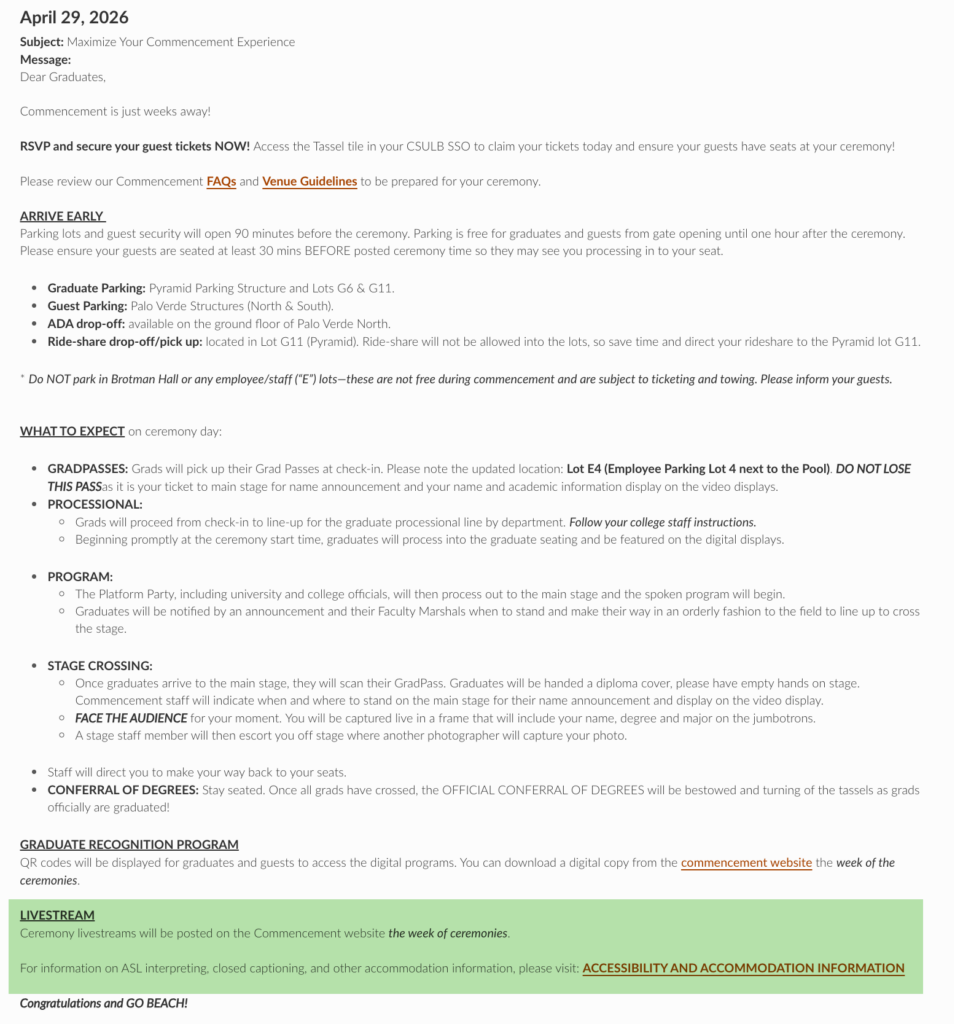
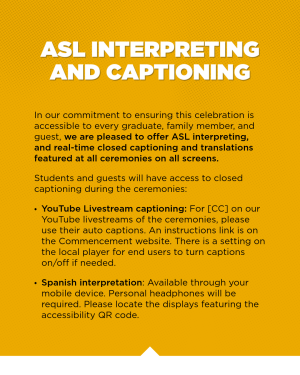
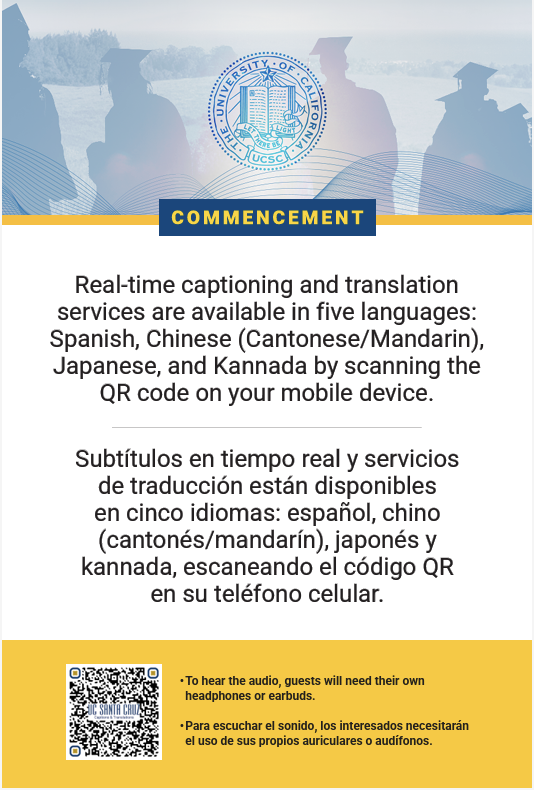
Pre-ceremony on-screen slide from UC Santa CruzA-frame display at UCI's ceremoniesA "know before you go" email sent out by CSULBSocial media post from CSULBFlyers available at the UC Santa Cruz venues
California State University, Long Beach incorporated accessibility information into its "Know Before You Go" communications, helping guests understand what services would be available before they arrived on campus. UC Santa Cruz promoted live captions and multilingual translation through QR codes, presentation slides, printed materials, and on-site signage throughout commencement.
These institutions recognized an important principle: accessibility is only effective when guests know it exists. Clear communication before and during the ceremony helps ensure that captions, translations, and other accessibility services are used by the people they were intended to support.
To help institutions plan future events, Aberdeen has assembled an In-Person Events Promotion Toolkitwith examples of pre-event communications, signage, QR code placement, presentation slides, and other best practices for increasing guest awareness and participation.
Accessibility Beyond the Venue
For many institutions, one of the biggest accessibility advancements this commencement season wasn't a captioning technology. It was how accessibility was delivered.
Traditionally, in-person guests and remote viewers often had different experiences. Accessibility inside the venue depended on the equipment available, while livestream viewers were often limited by the capabilities of the streaming platform itself. Most mainstream platforms support only basic live accessibility features, typically limiting institutions to a single translated language or a single live audio translation during the event. Additional languages are often only available after the livestream has concluded.
Aberdeen's browser-based streaming player removes those limitations. Instead of relying on the accessibility features built into a streaming platform, universities can provide a dedicated viewing experience that combines the live video with synchronized captions, multilingual subtitles, and AI-powered voice translations. This enables multiple languages to be available simultaneously during the live event while delivering a consistent experience for guests attending in person and those watching remotely.
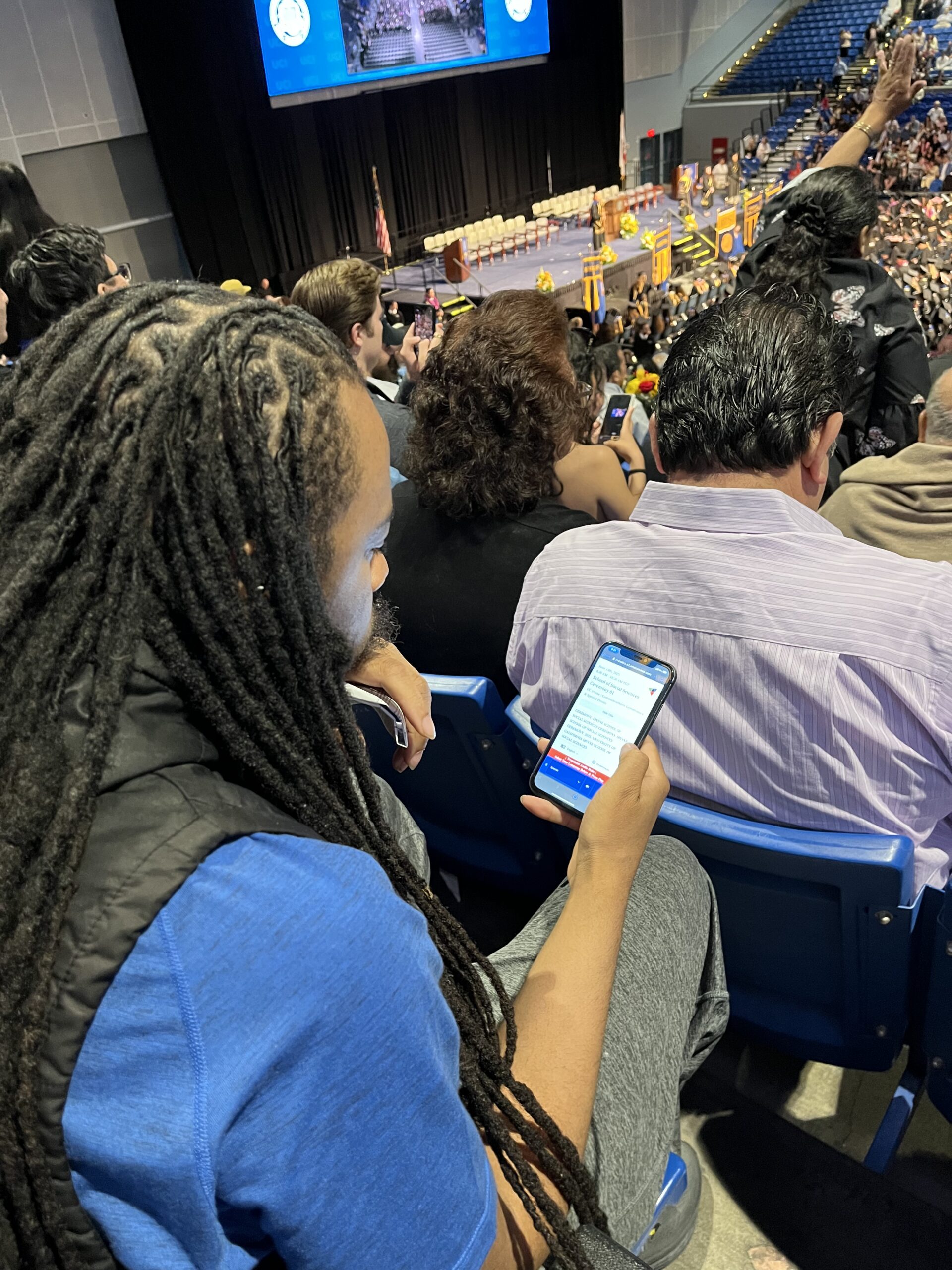
The same experience extended to guests attending in person. Rather than requiring dedicated receivers or venue-provided hardware, attendees could simply scan a QR code and follow along on their own phones using the same captions, translations, and audio available through the livestream.
For California State University, Long Beach, this flexibility was particularly valuable. Returning commencement ceremonies to campus meant the university was no longer limited to the accessibility resources provided by an outside venue. Combined with the streaming player, accessibility became available both inside the ceremony and for family members watching remotely.
Human Expertise and AI Continue to Complement One Another
Every multilingual commencement begins with a high-quality English caption feed.
For the Spring 2026 season, 612 hours of English captions were created by professional human captioners, while 82 hours used Aberdeen's ASR Writer. Those English captions then became the foundation for AI-powered subtitles and voice translations, helping families experience ceremonies in the language they understand best.
English Caption Sources (Spring 2026)
Professional human captioners remained the primary workflow, while ASR expanded as an additional option.
English Caption Sources (Spring 2026)
Professional human captioners remained the primary
workflow, while ASR expanded as an additional option.
English Caption Source
Hours
Professional Human Captioners
612
ASR Writer
82
Note: These figures represent the source of the English captions
only. AI-powered translation was used to generate multilingual
subtitles and audio translations for supported languages
regardless of the English caption source.
Note: These figures represent the source of the English captions only. AI-powered translation was used to generate multilingual subtitles and audio translations for supported languages regardless of the English caption source.
This distinction is important. The chart above represents only the source of the English captions. Once accurate English captions are available, Aberdeen's AI translation technology can generate live subtitles and audio translations in over 100 languages, regardless of whether the English captions originated from a professional captioner or ASR.
Rather than replacing one another, human expertise and AI work together. Professional captioners continue to be the preferred choice for many commencement ceremonies because they can make editorial decisions that improve the guest experience. During graduate name reading, for example, captioners typically omit long sequences of student names and resume captioning when speakers return to remarks or announcements.
ASR, by contrast, continuously transcribes speech and may attempt to caption every name without extensive preparation and custom vocabularies. As ASR technology continues to improve, it is becoming a practical option for more events. In both cases, AI translation extends accessibility well beyond English, allowing more families to fully participate in the celebration.
Building on Shared Success
While every institution's commencement is unique, one trend became increasingly apparent throughout the Spring 2026 season: universities are learning from one another.
Many of the institutions that adopted new accessibility services this year first encountered these approaches through conversations with peer universities, recommendations from trusted colleagues, or demonstrations at higher education conferences. As successful implementations become more visible, accessibility is becoming less about trying something new and more about adopting practices that have already proven successful elsewhere.
This collaborative exchange of ideas continues to accelerate the adoption of accessible commencement experiences across higher education.
Looking Ahead
The Spring 2026 commencement season demonstrated that accessibility is becoming a more intentional part of commencement planning.
Institutions are evaluating accessibility earlier in the planning process, communicating services more proactively, selecting languages based on the needs of their communities, and extending accessible experiences beyond the venue through mobile devices and livestreams. They are also choosing the combination of human expertise and AI technologies that best supports the goals of each ceremony.
The season also reflected a broader shift in how universities view accessibility. Rather than focusing on individual accommodations, institutions are designing commencement experiences that enable more graduates, families, and guests to participate fully, whether they are attending in person or joining remotely.
As technology continues to remove barriers and institutions continue to share successful practices, accessibility is becoming an expected part of commencement planning and an increasingly important part of celebrating student achievement.
Continue the Conversation
Planning Your Next Commencement?
If you're planning a future commencement and would like to explore accessibility options, compare approaches, or learn how other institutions are implementing live captioning, multilingual translation, and accessible livestreams, we'd be happy to share our experience.
Whether you're just beginning to plan or refining an existing program, our team can help you evaluate solutions that best fit your ceremony and your community.
Matt Cook joins Kenny Jahng on the Church Tech Today Podcast
We’re excited to share that our President, Matt Cook, was recently featured on the Church Tech Today Podcast hosted by Kenny Jahng — one of the leading voices in digital ministry and AI innovation for churches. The conversation dove into how Aberdeen’s real-time AI captioning and translation tools are making worship services more accessible, inclusive, and effective for everyone in the pews.
The conversation wasn’t just about cool tech — it was about mission. AI is opening the door for churches to reach people who’ve been sitting quietly in their pews, unable to fully engage — whether due to hearing loss, language barriers, or generational differences in media consumption.
As Kenny noted, "Most churches are barely scratching the surface of what's possible." But with the right tools, accessibility can be seamless, affordable, and incredibly impactful.
Key Takeaways from the Interview
1. AI Makes Accessibility Affordable for Every Church
Matt shared how Aberdeen has taken technology once reserved for large, media-savvy churches — and made it accessible for congregations of all sizes. Even 100-member churches are now using AI captioning and translation to serve ESL communities and individuals with hearing loss.
“We’ve had churches start this just to help one deaf member, and suddenly realize there are more people quietly struggling to engage — and they begin reaching new audiences they never expected.” — Matt Cook, Aberdeen
2. Captions Aren’t Just for the Hearing Impaired
More than 70% of Gen Z and over 50% of Millennials now watch content with captions on. It’s not an accessibility issue — it’s an engagement issue.
Captions help with focus, retention, and accessibility for everyone — not just those with hearing impairments.
“Captions help us absorb more. They’ve become part of how the next generation engages with content, including sermons.” — Kenny Jahng
3. Live, In-Person Captions Are Easier Than Ever
Churches don’t need expensive gear or complex workflows. Aberdeen’s AI captioning and translation system works right from the audio feed churches already have. Viewers can scan a QR code and get real-time captions or listen to a voice dub in their preferred language — right on their phone.
“Setup takes just minutes. Most churches already have everything they need.” — Matt Cook
4. Voice Dubbing in 60+ Languages
Beyond just captions, Aberdeen offers AI voice dubbing — allowing attendees to hear the sermon in real time in their own language, with natural inflection and clarity. This opens the door to multi-generational families, immigrant communities, and global reach without needing separate services.
A Tool for Growth, Not Just Accommodation
Kenny brought up an important shift in thinking: Captioning and translation aren't just for “accommodation” — they’re tools for growth and connection.
Whether it’s helping Gen Z absorb more of the message, allowing a Spanish-speaking grandmother to understand her grandson’s baptism, or making someone with hearing loss feel seen and included — accessibility is kingdom work.
Try It with Your Own Content
As Matt shared on the podcast, Aberdeen offers churches a free trial month and will even demonstrate the technology using the church’s own sermon video.
Real-time captions
Mobile access via QR code
Translation and voice dubs in 60+ languages
Seamless setup using your existing equipment
Ready to See It in Action?
Curious how it would work for your services? We’re now offering personalized live demos using your actual content so you can see how real-time captions and multilingual translations would look during your own worship services.
Get guidance tailored to your tech setup
Experience the interface with familiar voices and formats
Evaluate translation quality in real-time
Schedule your one-on-one demo now using our calendar link below.
In a recent StreamingChurch.tv webinar, Aberdeen Broadcast Services President Matt Cook joined Phil Thompson to discuss the powerful role artificial intelligence is playing in making church services more accessible—both in-person and online.
As churches strive to reach broader and more diverse communities, the need for multilingual captioning and translation has never been greater. During the conversation, Matt shared how Aberdeen has spent years refining AI tools behind the scenes before confidently bringing them forward for real-time use.
“We’ve been using AI in post-production captioning for years—combining it with human editors to ensure top-tier quality,” Matt explained. “But we didn’t want to offer it live until we were confident it would meet the high standards our clients expect.”
A New Era of Real-Time Accessibility
What once required dedicated human captioners or translators can now be achieved instantly through AI—with support for over 60 languages in both subtitles and audio dubbing.
Whether you’re broadcasting to viewers across the globe or welcoming a multilingual congregation in your sanctuary, Aberdeen’s real-time solution is built to scale with you. During the live demo, attendees saw firsthand how captions and translations could be instantly toggled across multiple devices—no app, log-in, or special equipment required.
Designed for Churches—Not Just Tech Experts
One of the biggest takeaways from the webinar was that you don’t have to be a tech expert to bring this level of accessibility to your church. Aberdeen’s cloud-based tools work with any encoder and can be used in both live streams and in-person worship services.
“It’s as simple as scanning a QR code or clicking a link. Your viewers can then choose their preferred language and follow along in real-time,” said Matt.
Watch the Full Webinar Replay
If you missed the live event or want to revisit what was shared, you can now watch the full replay on demand here:
You’ll see:
A live demo of the tech in action
How churches are using it for both local and international outreach
A walkthrough of Aberdeen’s 60+ language support
The inspiration behind Aberdeen’s long-term commitment to accessibility
See It in Action—With Your Own Content
Curious how it would work for your services? We’re now offering personalized live demos using your actual content so you can see how real-time captions and multilingual translations would look during your own worship services.
Experience the interface with familiar voices and formats
Evaluate translation quality in real-time
Get guidance tailored to your tech setup
Spots are limited and filling up quickly. Schedule your one-on-one demo now using our calendar link below.
Churches today have an unprecedented opportunity to reach global audiences, welcome newcomers, and serve members of all abilities and backgrounds. With trusted AI-powered tools from Aberdeen, you can break language barriers and make sure no one misses the message.
Learn more about ASR-powered accessibility tools for churches here.
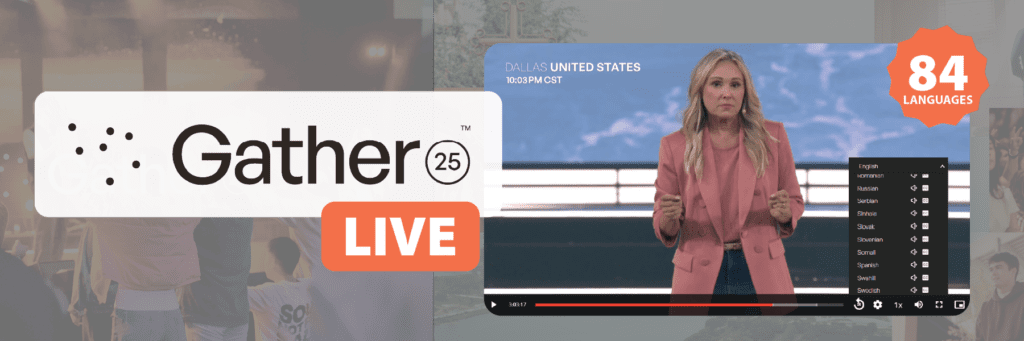
Gather25, hosted by IF:Gathering, was a groundbreaking 25-hour global broadcast connecting audiences across every continent. With over 1.25 million online viewers and participation from more than 21,000 Gather Groups worldwide, the event aimed to inspire and unite the global church community.
Aberdeen Broadcast Services has partnered with IF:Gathering since 2020, providing both live captioning for streaming events and post-produced captioning for archived content. Gather25 marked an ambitious new chapter in that partnership—the first time Aberdeen was brought on to help scale the event’s global reach through real-time translation.
As far as we know, this was a first-of-its-kind undertaking: a multilingual livestream of this magnitude, requiring impeccable coordination across dozens of languages and platforms. Aberdeen was one of several trusted vendors, working alongside the technology and broadcast partners hired for the event to make it all possible.
The Challenge: Delivering 25 Hours of Multilingual, Real-Time Access
Supporting a continuous, multilingual broadcast of this scale introduced several technical challenges:
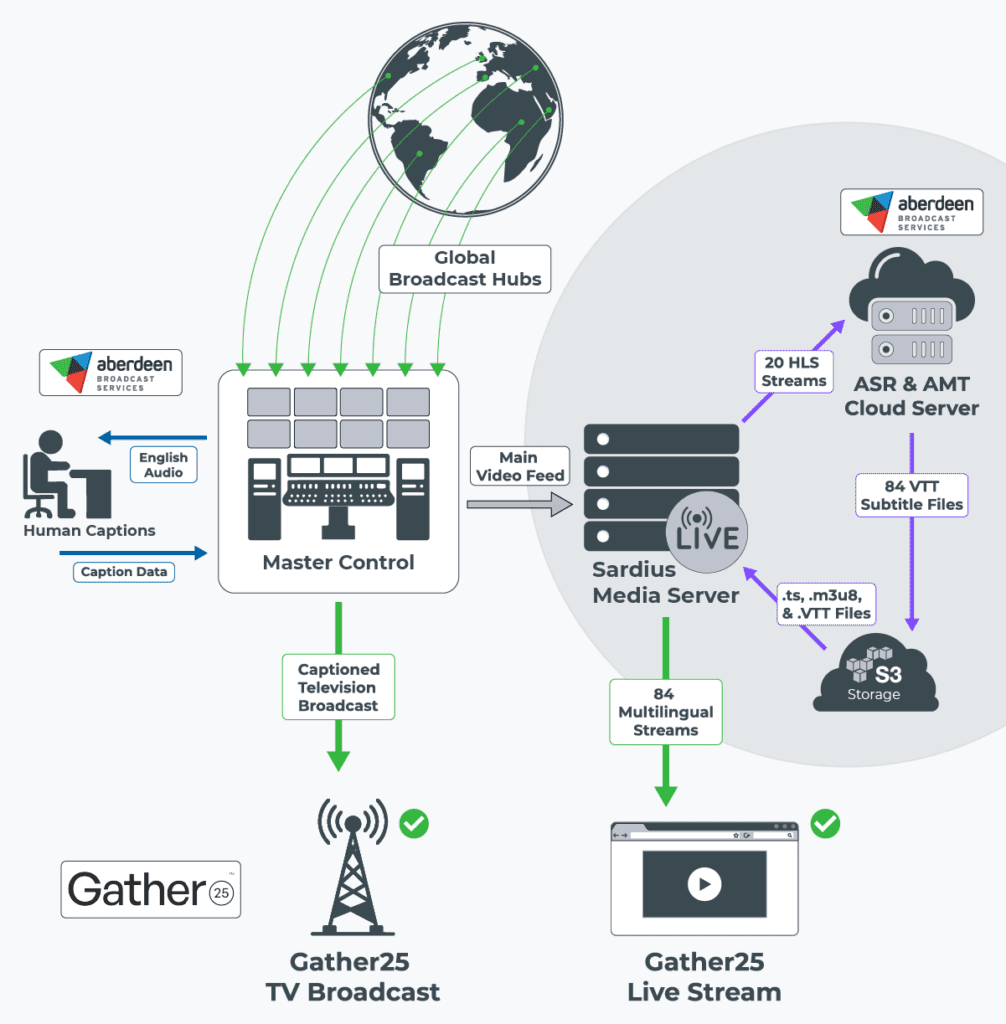
Maintain uninterrupted captioning across a 25-hour live stream spanning 7 global broadcast hubs.
Generate real-time captions and translations for 84 language streams with high accuracy and minimal latency.
Implement a dynamic captioning system that allows viewers to pause, rewind, and review up to four hours of content during the live event ("rolling DVR" functionality).
Collaborate across multiple teams — Element Media Group (master control), Sardius (video player delivery), SyncWords (captioning/subtitle platform), and Interprefy (live interpreters) — to ensure flawless live execution.
Deliver caption files in a continuous VTT format, dynamically updating during the broadcast to support both live viewing and post-event on-demand access.
The Solution: Continuous Live Captioning and Translation Across 84 Languages
Before the event went live, a workflow that could support uninterrupted, real-time captioning and translation across dozens of simultaneous streams needed to be built. This required deep coordination with multiple teams to align audio sources, language feeds, and delivery endpoints. Our goal was to ensure every segment of the broadcast could be accurately captioned and translated with minimal manual intervention once the event began.
A key technology partner behind this workflow was SyncWords, whose platform Aberdeen leverages to manage real-time captioning and translation delivery. SyncWords played a vital behind-the-scenes role in not only powering the infrastructure we used to deploy captions across dozens of streams but also collaborating directly with engineers at Sardius and Elemental Media to implement specialized audio-isolation coding for the event. This coordination ensured that every audio feed we received was optimized for clean, accurate transcription and translation at scale.
Pre-Event Testing
To guarantee performance, Aberdeen conducted over 50 hours of pre-event testing, stress-testing multi-language streams, and simulating 25-hour sessions to ensure system endurance. A key priority was ensuring that VTT caption files would function as continuously updated feeds, rather than static uploads. This real-time updating was essential for Sardius’ platform to support both live captions and rolling DVR features, while also allowing seamless access to captions during on-demand playback after the event.
Streaming Caption Workflow
In a typical video workflow, captions are created after recording, uploaded separately, and synced to on-demand content. For Gather25’s livestream, captions had to be generated and delivered in real time, alongside the video stream.
The system worked like this:
Live video was broken into segments (HLS .ts files) and stored in an S3 bucket, alongside a .m3u8 manifest file managing playback.
Simultaneously, a VTT subtitle file was created and appended in real time—each new caption line was added to the file without restarting it.
This continuous file structure allowed Sardius’ player to provide viewers with immediate access to live captions while also enabling DVR controls—viewers could rewind up to four hours and then return to the live stream without losing their place.
Once the event ended, these same VTT files remained attached to the recorded content for full accessibility during on-demand viewing.
This architecture required precise timing, structured file delivery, and full alignment with Sardius’ streaming infrastructure.
What's an HLS Stream?
An HLS stream (HTTP Live Streaming) delivers video content over the internet in small, manageable chunks. The video is split into short segments (usually 2–10 seconds long) and saved as .ts (transport stream) files. A playlist file (called a .m3u8) tells the video player what order to play those chunks in. As a viewer watches, their device downloads and plays the segments one at a time, allowing smooth playback, even with slow or fluctuating internet.
Workflow Optimization
Aberdeen’s team engineered a sophisticated workflow to process 20 incoming HLS feeds. Working closely with Element Media Group, which managed master control and delivered stripped audio to Sardius, Aberdeen received feeds prepped for accessibility:
Speech-Only Audio Extraction: Each of the 20 HLS streams included up to 16 audio tracks; Aberdeen pulled content from Track 16, where music had been removed to isolate spoken word, ensuring clean inputs for accurate captioning and translation.
Language Processing:
Live English captioning was performed by Aberdeen’s professional human captioners via a broadcast encoder at Master Control, ensuring exceptional accuracy of the English captions for the television broadcast.
Translated English to Kinyarwanda, a language not supported by any of the major ASR engines, demonstrating a custom solution beyond standard automation.
Created native-language captions for 14 non-English spoken feeds, including Arabic, Mandarin, French, German, Portuguese, and more.
Translated stripped English audio into 68 other languages, selecting the best available machine translation engine per language (prioritizing: DeepL > OpenAI > Amazon > Google > Azure).
File Management: All caption files were delivered to Sardius using clearly labeled S3 bucket destinations (e.g., EN for English, ES for Spanish), with structured naming conventions to ensure accurate mapping during the live event and in the post-event archive.
Impact: Real-Time Engagement and Global Reach Through Accessibility
Gather25’s accessibility efforts produced measurable results:
Over 1 million minutes of English captions and translations were viewed during the live stream, equal to nearly 17,000 hours of real-time engagement.
Continuous, real-time VTT streaming ensured seamless live accessibility, enabled four-hour rolling DVR, and extended caption access post-event.
Aberdeen's workflow operated without any critical interruptions across the entire 25-hour window, validating the strength of its testing protocols and system reliability.
By combining AI-driven automation, human captioning expertise, and a deep integration with broadcast systems, Aberdeen Broadcast Services delivered scalable, high-quality accessibility at a truly global level.
Conclusion: Advancing Live Event Accessibility on a Global Scale
Gather25’s mission to unite believers around the world was made stronger through its commitment to accessibility. With real-time captioning and translation across 84 language streams, Aberdeen Broadcast Services helped make this global event inclusive, impactful, and available to all.
For organizations planning large-scale, multilingual broadcasts, Aberdeen’s tested and proven solutions offer the reliability and scalability needed to reach a worldwide audience.
Let’s talk about how we can support your next event.Contact us to learn more.
The recent pivot to embrace the perks of AI for captioning allowed us at Aberdeen to set our sights on integrating it into parts of our Spanish workflow via our Aberscript transcript editor application, something which we began to use for English programs over 5 years ago and have now fully implemented for Spanish content. This was developed, in part, as an effort to keep transcription in-house and reduce the typical time it would take to transcribe a program from scratch before preparing it for the finishing touches in MacCaption.
Our Spanish captioning clients offer content that covers a variety of topics such as news, sports, entertainment, medicine, automotive sales, and Christian programming. The initial challenge was choosing the right field to begin testing our AI model. Initial test programs often included multiple speakers throughout the program who frequently code-switch with English or Spanglish phrases, adding complexity to the transcription process. Due to frequent language shifts, testing AI was not optimal for this variety.
Our best bet was looking at the content that makes up the majority of our day-to-day work: Christian content, where it’s much easier to find a single speaker addressing his or her audience and where the formality of language is likely to remain consistent and free of informal slang, contractions, and colloquialisms. Given our success with English captioning, we decided to leverage AI’s many advantages—automating repetitive functions, enabling real-time generation and quicker turnarounds, maximizing speed and efficiency, and offering vastly improved and adaptable machine learning and speech recognition—perks that tend to outperform traditional methods.
By far, one of the biggest perks has been AI's ability to generate words instantly and accurately, helping to reduce some of the tediousness involved in typing out words, phrases, sentences, and so on. AI has now achieved optimal accuracy with the correct transcription of accent marks in Spanish vowels (a, e, i, o, u) as well as the ñ. This results in a more free-flowing and undisturbed editing process.
For AI to be successful in this regard, it needs to know when to pick up the natural stress in syllables so that it generates the accent mark on top of the correct letter. Here are some of the common Christian terms and names that appear frequently in Spanish and were properly transcribed with the correct accent marks: amén, Jehová, Adán, oración, redención, apóstol, ángel, Espíritu Santo, Jesús, Lázaro, Noé, María, Salomón, Salvación. Knowing this, the next focus was implementing AI for a client whose content aligned with our goal of maximizing efficiency and achieving a quicker turnaround.
The first stage of incorporating AI into our Spanish workflow began in mid-2024, as we introduced the Spanish-dubbed version of one of our biggest clients. And given that we were now making this transition, with recurring episodes airing on many different networks, we were looking for ways to make progress without outsourcing. The workflow associated with this program was once destined for out-of-house transcription and captioning--with only a brief QC and final exports created in-house. In the past, a few business days for two different programs were generally required, given that the vendor needed ample time to transcribe from scratch and to caption before sending us the completed files for a final QC.
At the beginning of our AI pivot for this particular client, every episode required about 90-120 minutes to transcribe from scratch, and another 45 minutes to complete the post-transcription QC and captioning in MacCaption. However, after months of fine-tuning and consistent use of Aberscript, now it only takes us around 90 minutes in total to complete each — 60 minutes for transcription and 30 for post-transcription QC and captioning — while still maintaining the same level of quality expected for this product level.
For our clients, these efficiencies allow us to respond quickly and accommodate shifting deadlines without compromising quality. AI helps us ensure your programs are captioned with accuracy and delivered on schedule, all without sacrificing the attention to detail your content deserves. It enables quicker turnarounds and supports urgent delivery timelines, something that’s become increasingly important in fast-paced production environments.
We are currently working on running other Spanish programs through our AI workflow to boost efficiency, accuracy, and work time goals. Without a doubt, we will continue to maximize its potential in 2025.
With AI-enhanced tools and a refined in-house workflow, we’re helping clients get accurate, broadcast-ready Spanish captions faster than ever, without sacrificing quality. Whether you’re managing weekly programs or shifting timelines, we’re here to make your process faster and more efficient.
In today's world defined by constant digital engagement, younger generations increasingly rely on captions and subtitles to enhance their viewing experience. This trend, largely popularized by Gen Z and Millennials, isn’t just limited to streaming shows or watching social media content; it’s spilling over into live events, with a strong case for captions as a way to boost engagement and attendance in venues that historically may have overlooked them, such as churches.
Here’s a look at the data supporting this movement and how churches can use captioning to foster a more engaging environment.
Younger Generations and the Subtitle Revolution
Preply, a language learning platform, conducted a survey titled, “Why America is Obsessed with Subtitles,” to explore the growing trend of subtitle usage among Americans. The study involved over 1,200 participants, aiming to understand how and why individuals use subtitles in their media consumption. The findings revealed that 50% of Americans watch content with subtitles most of the time, with younger generations, particularly Gen Z, showing a greater preference for subtitle use.
According to Preply's survey, 70% of Gen Z and 53% of Millennial viewers turn on subtitles most of the time when they watch content. This statistic highlights a major shift in media consumption patterns: it’s not just about watching but understanding and engaging with content that drives this trend.
74% of Gen Z also prefer subtitles when watching content in foreign languages. With the global reach of platforms like Netflix, young people are more accustomed than ever to encountering diverse media, where subtitles bridge language and comprehension gaps.
Another 57% of younger viewers report watching content in public places, using captions to stay engaged while maintaining privacy or avoiding sound disruptions. This trend underscores their reliance on captions to stay connected to content in any setting.
This data reveals a generation that sees captions not as an add-on but as an essential part of the viewing experience. For churches, this could signal an opportunity: integrating captions into services may not only help with accessibility but also align with the viewing habits of younger generations.
Captioning Live Events: A Path to Higher Engagement
The impact of captions on in-person attendance is significant. A study from Stagetext revealed that 31% of people would attend more live events if captions were readily available, with younger people leading this interest: 45% of 18-25-year-olds would be more likely to attend events if they were captioned, compared to 16% of those over 56.
This enthusiasm for live captions reflects a shift in how younger generations want to consume live content. Captions at events enhance accessibility for everyone, regardless of hearing ability, and address concerns with acoustics or unclear speech, which often deter audiences. In the church context, offering captions during sermons, worship songs, or events could break down barriers that may otherwise prevent younger individuals from fully engaging.
Engaging a New Generation: How Captioning Can Help Churches Reconnect with Young Adults
Christian churches across the United States are increasingly challenged to capture the interest and attendance of younger generations, who are showing declining levels of religious affiliation and engagement." The Pew Research Center's 2019 article, "In U.S., Decline of Christianity Continues at Rapid Pace," highlights a significant decline in Christian affiliation among younger Americans. The data indicates that only 49% of Millennials (born between 1981 and 1996) identify as Christians, compared to 84% of the Silent Generation (born between 1928 and 1945).
With reports indicating a decline in church attendance in the U.S., many churches are seeking strategies to re-engage their congregations, especially young adults. Captions could be a powerful, practical solution.
Offering live captions during services could address several issues:
Accessibility and Inclusivity: Young people who are accustomed to captions often view them as an essential tool for inclusion. By offering captions in church, congregations can signal a commitment to inclusivity, welcoming not only those with hearing impairments but also those who may benefit from captioning for other reasons, like understanding speakers with different accents or enhancing focus.
Boosting Engagement: With 55% of Americans saying it’s harder to hear dialogue in shows than it used to be, similar issues with acoustics or clarity in large church spaces might deter engagement. Captions can solve this problem, making services clearer and more engaging for all attendees.
Attracting a Tech-Savvy Generation: For a generation that turns to their phones for entertainment, information, and engagement, adding captions is a way of bridging familiar digital practices into the church environment. Just as captions boost engagement on platforms like Instagram and TikTok, they could play a similar role in church services.
Providing a Multilingual Option: In a diverse country, language can be a barrier for many congregants. With nearly 1 in 5 Preply survey respondents using subtitles to learn a new language, churches could consider offering caption translations in key languages relevant to their community, creating a multilingual service environment.
Moving Forward: A Call for Churches to Embrace Captioning
By understanding the viewing habits of younger generations, churches have the opportunity to create an environment that aligns with their engagement preferences. Embracing captioning technology for in-person services and online sermon streams not only makes services more accessible but can also foster deeper engagement, particularly among younger congregants who see captions as an essential part of their everyday experience.
As churches consider how best to adapt to changing times, incorporating live captions could be a powerful step toward renewing attendance and helping younger generations feel seen, heard, and included in the community. It’s a practical, meaningful solution that could not only enhance accessibility but help bridge generational gaps, allowing churches to resonate with the next generation and grow their community in an inclusive and modern way.
ASR CAPTIONING & TRANSCRIPTION SERVICES
In-person Captions & Translation
Transform your in-person church services with instant, real-time captioning & translation.
With our real-time captioning solution, you can ensure that everyone, regardless of hearing ability or language preference, can follow along with ease. Designed for seamless integration into your existing setup, our captions are easy to use and perfect for enhancing the inclusivity of your in-person worship experiences.
Automatic Speech Recognition (ASR) is now making a substantial impact on how local churches connect with their communities, breaking down barriers once caused by financial limitations. With ASR, churches can now offer inclusive services to the Deaf and Hard of Hearing (D/HH) community. But it doesn’t stop there—when combined with Automatic Machine Translation (AMT), this powerful duo overcomes language hurdles, translating sermons into dozens of languages. Even the smallest congregations can now reach a global audience, sharing their message far and wide.
We previously explored the ethical and theological concerns with AI in the Church in our last blog post: The Role of AI in Enhancing Church Accessibility and Inclusion.
While human-generated captions and translations always offer the highest quality, ASR and AMT provide a cost-effective solution that can be utilized by churches and ministries of any size or budget. Imagine your sermon reaching the Deaf and Hard of Hearing (D/HH) community, allowing for full participation, or sharing your message in various languages to a worldwide audience that might otherwise have been unreachable. AI-powered closed captioning and translations help make this a reality. ASR captions and translations are not only a technological advancement; they are tools for inclusivity and global outreach.
Churches aiming to make a significant impact can turn to AI-powered accessibility tools, once considered out of reach, for preaching and teaching. Practical uses of ASR include:
Live Streaming: AI-powered ASR can integrate with live streaming services to provide real-time captions, subtitles, or even real-time voice dubbing, making worship services accessible to a global audience. This allows viewers from different parts of the world to follow along with the sermon, regardless of their language or hearing ability, thereby expanding the church’s reach and inclusivity.
In-Person Services: ASR technology can make live sermons more accessible by providing real-time text or audio dubs on congregants’ mobile devices. By making the sermon text available on personal devices, churches can enhance comprehension and engagement for in-person attendees.
Notes/Summaries: After a sermon is transcribed, extend the message's reach with our AI-enhanced sermon extras. Whether you want to generate Bible studies or daily devotionals, curate key terms and highlight Bible verses, or create summaries and discussion questions, our enhanced transcript materials are designed to add value and extend the impact of your content. Create endless content from a single sermon.
Aberdeen’s new ASR solution, developed with ministry in mind, employs robust AI engines and large language models to provide a powerful advantage in delivering Christian content. Each solution is carefully crafted to fit your specific ministry needs, providing high-quality captions at a fraction of the cost.
ASR CAPTIONING & TRANSCRIPTION SERVICES
In-person Captions & Translation
Transform your in-person church services with instant, real-time captioning & translation.
With our real-time captioning solution, you can ensure that everyone, regardless of hearing ability or language preference, can follow along with ease. Designed for seamless integration into your existing setup, our captions are easy to use and perfect for enhancing the inclusivity of your in-person worship experiences.
Discover how Aberdeen’s ASR solution offers a cost-effective approach to closed captioning & translation. Learn more here: Aberdeen ASR Closed Captioning.
Closed captioning serves as a powerful tool that extends its impact far beyond aiding the deaf and hard-of-hearing community. Its significance transcends age, abilities, and background, making it an invaluable resource for both educators and learners. In the digital age, closed captioning has emerged as a transformative resource, with research revealing that students, English language learners, and children with learning disabilities who watch programs with closed captioning turned on improve their reading skills, increase their vocabulary, and enhance their focus and attention.
The scholarly article, Closed Captioning Matters: Examining the Value of Closed Captions for All Students (Smith 231) states that “Previous research shows that closed captioning can benefit many kinds of learners. In addition to students with hearing impairments, captions stand to benefit visual learners, non-native English learners, and students who happen to be in loud or otherwise distracting environments. In remedial reading classes, closed captioning improved students’ vocabulary, reading comprehension, word analysis skills, and motivation to learn (Goldman & Goldman, 1988). The performance of foreign language learners increased when captioning was provided (Winke, Gass, & Sydorenko, 2010). Following exams, these learners indicated that captions lead to increased attention, improved language processing, the reinforcement of previous knowledge, and deeper understanding of the language. For low-performing students in science classrooms, technology-enhanced videos with closed captioning contributed to post-treatment scores that were similar to higher-performing students (Marino, Coyne, & Dunn, 2010). The current findings support previous research and highlight the suitability of closed-captioned content for students with and without disabilities.”
Reading Rockets, a national public media literacy initiative provides resources and information on how young children learn and how educators can improve their students’ reading abilities. In the article, Captioning to Support Literacy, Alise Brann confirms that “Captions can provide struggling readers with additional print exposure, improving foundational reading skills.”
She states, “In a typical classroom, a teacher may find many students who are struggling readers, whether they are beginning readers, students with language-based learning disabilities, or English Language Learners (ELLs). One motivating, engaging, and inexpensive way to help build the foundational reading skills of students is through the use of closed-captioned and subtitled television shows and movies. These can help boost foundational reading skills, such as phonics, word recognition, and fluency, for a number of students.”
Research clearly demonstrates that “people learn better and comprehend more when words and pictures are presented together. The combination of aural and visual input gives viewers the opportunity to comprehend information through different channels and make connections between them” (The Effects of Captions on EFL Learners’ Comprehension of English-Language Television Programs).
From bolstering reading skills, to enhancing focus and language comprehension, the benefits of closed captioning are numerous. We at Aberdeen Broadcast Services are committed to providing quality closed captions for television (TV) and educational programming.
Here is the public service announcement (PSA) we released in 2016 on local broadcast stations, emphasizing how closed captioning can enhance children's literacy skills.
This article was co-written with the help of both ChatGPT and Google Bard as a demonstration of the technology discussed in this article. You can also read along with Aberdeen's President, Matt Cook in the recording below - but not really, this is Matt's voice cloned using a short clip of Matt's voice given to AI.
Artificial Intelligence (AI) has revolutionized numerous industries, and its influence on language-related technologies is particularly remarkable. In this blog post, we will explore how AI is transforming closed captioning, language translation, and even the creation of cloned voices. These advancements not only enhance accessibility and inclusion but also have far-reaching implications for communication in an increasingly globalized world.
AI in Closed Captioning
Closed captioning is an essential feature for individuals who are deaf or hard of hearing, enabling them to access audiovisual content. Traditional closed captioning methods rely on human transcriptionists, however, AI-powered speech recognition algorithms have made significant strides in this field.
Using deep learning techniques, AI models can more accurately transcribe spoken words into text, providing real-time closed captioning. This is not up to the FCC guidelines for broadcast but is oftentimes good enough for other situations where the alternative is to have no closed captions at all. These models continuously improve their accuracy by analyzing large amounts of data and learning from diverse sources. As a result, AI has made closed captioning more accessible, enabling individuals to enjoy online videos with greater ease.
Our team is working hard to develop and launch AberScribe, our new AI transcript application powered by OpenAI, sometime in mid-2024. From any audio/video source file, the AberScribe app will create an AI-generated transcript that can be edited in our online transcript editor and exported into various caption formats. AberScribe will also have added features for creating other AI-generated resources from that final transcript. Resources like summaries, glossaries of terms, discussion questions, interactive worksheets, and many more - the possibilities are endless.
Language barriers have long hindered effective communication between people from different linguistic backgrounds. However, AI-powered language translation has emerged as a game-changer, enabling real-time multilingual conversations and seamless understanding across different languages.
Machine Translation (MT) models, powered by AI, have made significant strides in accurately translating text from one language to another. By training on vast amounts of multilingual data, these models can understand and generate human-like translations, accounting for context and idiomatic expressions. This has empowered businesses, travelers, and individuals to engage in cross-cultural communication effortlessly.
In addition to written translation, AI is making headway in spoken language translation as well. With technologies like neural machine translation (NMT), AI systems can listen to spoken language, translate it in real-time, and produce synthesized speech in the desired language. This breakthrough holds immense potential for international conferences, tourism, and fostering cultural exchange.
Cloned Voices and AI
The advent of AI has brought about significant advancements in speech synthesis, allowing for the creation of cloned voices that mimic the speech patterns and vocal identity of individuals. While cloned voices have sparked debates regarding ethical use, they also present exciting possibilities for personalization and accessibility.
AI-powered text-to-speech (TTS) models can analyze recorded speech data from an individual, capturing their vocal characteristics, intonations, and nuances. This data is then used to generate synthetic speech that sounds remarkably like the original speaker. This technology can be immensely beneficial for individuals with speech impairments, providing them with a voice that better aligns with their identity.
Moreover, cloned voices have applications in industries like entertainment and marketing, where celebrity voices can be replicated for endorsements or immersive experiences. However, it is crucial to navigate the ethical considerations surrounding consent and proper usage to ensure that this technology is used responsibly.
Conclusion
Artificial Intelligence continues to redefine the boundaries of accessibility, communication, and personalization in various domains. In the realms of closed captioning, language translation, and cloned voices, AI has made significant strides, bridging gaps, and enhancing user experiences. As these technologies continue to evolve, it is vital to strike a balance between innovation and ethical considerations, ensuring that AI is harnessed responsibly to benefit individuals and society as a whole.