For many organizations, the April 24, 2026, deadline around ADA Title II has raised an important question: Is this a new requirement, or something that’s been in place all along?
The answer is straightforward: Accessibility under ADA Title II is not new. What’s new is clarity.
In 2024, the Department of Justice issued a final rule that formally defines how ADA Title II applies to websites, mobile apps, and digital content. For the first time, public entities now have a clear technical standard and a firm deadline.
This post breaks down:
What existed before
What the new rule clarifies
Who is affected (and when)
How this impacts captions, video, and accessibility moving forward
What ADA Title II Already Requires
Under the Americans with Disabilities Act (ADA) Title II, state and local governments have long been required to provide equal access to their programs, services, and activities, along with effective communication for individuals with disabilities.
In practice, this has always applied to core public functions like meetings, educational programs, and government services. As digital communication became central to how these services are delivered, enforcement made it increasingly clear that the same expectations extended to websites, online video, and other digital materials.
Accessibility in digital environments wasn’t new; it was a continuation of an existing requirement.
What the 2024 Rule Clarifies
The DOJ’s 2024 update does not change the core obligation. It defines it.
For the first time, public entities now have:
A clearly defined scope (websites, apps, and digital content)
While the requirement itself was well established, how to meet it was not.
There was no officially defined technical standard, no universal deadline, and no consistent enforcement model. As a result, organizations relied on interpretation, guidance, and precedent to determine what “accessible” meant in practice.
Much of that guidance came through enforcement and legal action. The Department of Justice and the Office for Civil Rights investigated complaints and entered into resolution agreements, while high-profile cases helped shape expectations. The University of California, Berkeley case required the removal or remediation of inaccessible online video content, and lawsuits involving Harvard and MIT reinforced expectations around captioning and digital access.
These cases made one thing clear: Accessibility was required, but organizations didn’t have a consistent, measurable way to implement it.
ADA Title II: Before vs. Now
Category
Previously (Before 2024 Rule)
Now (2024 Rule – Effective 2026/2027)
Legal Requirement
Accessibility required under ADA Title II
Accessibility still required
Digital Coverage
Implied through interpretation and case law
Explicitly includes websites, apps, and digital content
Technical Standard
Not formally defined
WCAG 2.1 Level AA required
Enforcement Style
Complaint-driven (OCR, lawsuits)
Proactive and enforceable
Deadlines
No universal deadline
April 2026 / April 2027
Captioning Expectation
Required under “effective communication”
Clearly required under WCAG
Consistency
Varied by organization
Standardized across public entities
What the Rule Says About Captions
One of the most immediate impacts of the rule is clarity around captions.
Under WCAG 2.1 Level AA:
Prerecorded video must include captions
Live video must include real-time captions
This aligns with how accessibility has already been enforced, but now it is explicitly defined and expected. Just as important, the standard is not simply whether captions exist, it’s whether they are effective.
WCAG does not define a specific accuracy percentage. Instead, it requires that captions present the full meaning of the content, including spoken dialogue and relevant non-speech elements, in a way that is properly synchronized and easy to follow. This is reinforced by ADA Title II’s broader requirement for effective communication: Captions must allow a viewer to fully understand the message—not just approximate it.
In practice, that means:
Errors that change meaning can create compliance risk
Missing speakers or key context can make captions insufficient
Captions must be timed correctly and appear in sync with the audio
Delays or poor timing can reduce usability and comprehension
With that in mind, it’s important to understand how different captioning approaches align with these expectations. There are two primary approaches used today: automated captioning powered by AI (ASR) and human captioning performed by trained writers.
In practice, the right choice comes down to context. ASR can be effective in controlled environments with clear audio and lower risk, offering a scalable and cost-efficient solution. Human captioning is better suited for high-stakes, complex, or public-facing content where accuracy, speaker identification, and reliability are critical.
The goal isn’t choosing a method—it’s ensuring the message is fully understood.
The “Older Content” Exception
The rule includes a limited exception for content created before April 24, 2026, but it’s narrower than many expect.
Older content can remain as-is only if it is truly archival. That means it is not actively used, not updated, and not part of any current program, service, or activity.
Where this gets important is how “use” is defined. If older content is still being used in any meaningful way, it must be made accessible—even if it was created years ago.
Common scenarios where older content must be updated
Training and education A recorded lecture from 2022 reused in a 2026 course must be captioned.
Ongoing programs or services A webinar library that users are encouraged to access is considered active content.
Linked or referenced materials An older video linked on a current webpage is no longer “archived.”
Frequently accessed resources If users regularly rely on it, it’s part of your current service.
When content may remain exempt
Content may qualify for the exception if it is:
Stored for recordkeeping or historical reference
Not linked from current pages
Not used in training, services, or public engagement
Left unchanged and not maintained
The practical way to think about it: If your audience is expected to use it, it must be accessible. The exception isn’t based on age; it’s based on relevance and use.
What About Language Requirements?
The rule does not require translation. There is no percentage threshold that triggers multilingual content, no requirement to offer multiple languages, and no rule that content in one language must be mirrored in another.
What the rule does require is consistency: Any language you provide must be accessible.
If an organization offers content in Spanish, that version must be accessible in Spanish. If content is delivered in English, it must be accessible in English.
For example, a Spanish video would need Spanish captions, and an English livestream would need real-time English captions.
Language access itself is governed by other regulations. ADA Title II focuses specifically on accessibility for people with disabilities, ensuring that whatever content is provided can be fully understood.
Who Needs to Comply, and When?
The rule applies to public entities under ADA Title II, including state and local governments, public universities, school systems, and municipal agencies.
The timeline is based on population size:
April 24, 2026
Applies to public entities serving 50,000+ people, such as:
Large cities and counties
State agencies
Major public universities
Large transit systems
April 26, 2027
Applies to entities serving under 50,000 people, including:
Smaller towns and municipalities
Rural counties
Smaller local agencies
The requirement is the same for both groups—only the timeline differs.
What About Churches and Private Organizations?
Churches are not considered public entities under ADA Title II and are generally exempt from ADA Title III as well. This means they are not legally required to meet WCAG standards.
However, many churches are still adopting accessibility tools like captions and translation—not because they are required to, but because they recognize the value. Accessibility improves understanding, supports multilingual communities, and helps remove barriers for first-time visitors.
Accessibility in this context isn’t about compliance. It’s about connection.
ADA Title II has required accessibility for decades. The 2024 rule does not introduce a new obligation—it provides a clear, consistent framework for meeting one that already existed.
For public entities, that means:
A defined standard (WCAG 2.1 AA)
A clear timeline (2026 / 2027)
And a shift toward building accessibility into digital content from the start
Accessibility has always been about ensuring people can fully receive the message. Now, there is a clear path for how to deliver it.
Closed captions have long been one of the most important accessibility tools in modern media. They transform spoken words, music, and sound cues into text, allowing Deaf and hard-of-hearing audiences to fully engage with film, television, and live programming.
Yet despite decades of progress in video technology, caption presentation itself has changed very little. The familiar format of white text at the bottom of the screen remains the standard across most platforms. While effective, this approach often strips away elements that hearing viewers naturally perceive, such as tone, pacing, emphasis, and speaker identity.
Caption with Intention is not simply a visual redesign. It is a captioning design system built on a simple yet powerful premise: captions should convey not only what is said but also how it is said.
The project explores ways to represent aspects of speech that traditional captions rarely capture:
Attribution Color and styling help viewers quickly identify who is speaking, particularly in scenes with multiple voices.
Synchronization Text timing and animation align more closely with natural speech patterns, improving readability and reducing cognitive load.
Intonation Typography reflects emphasis, emotion, and vocal energy, offering viewers cues about delivery and tone.
These ideas may sound subtle, but they address a real gap in how captioned content is experienced.
Designed With Community Input
One of the most compelling aspects of Caption with Intention is its development process. The system was shaped through collaboration with members of the Deaf and hard-of-hearing community. That involvement grounds the work in lived experience rather than purely aesthetic experimentation.
Accessibility innovations are most meaningful when they are informed by the audiences they are intended to serve. This project reflects that principle.
A Glimpse of a Possible Future
Caption with Intention is currently a design framework rather than a fully automated captioning engine. Its concepts still require thoughtful implementation. Even so, the direction is notable.
As AI, real-time rendering, and player technologies continue to evolve, it is easy to imagine a future where expressive captioning systems like this can be applied at scale. Not as decorative features, but as standard components of accessible storytelling.
Why It Caught Our Attention
At Aberdeen, we spend a great deal of time thinking about how captions function in practical, regulatory, and production contexts. Accuracy, timing, compliance, and reliability always come first.
Projects like Caption with Intention invite a different but equally important question: What if captions could better reflect the emotional and narrative texture of a scene?
The idea does not replace the fundamentals. It expands the conversation.
We are not involved in the project, nor are we presenting this as an endorsement or partnership. We simply find the thinking behind it compelling. It represents the kind of experimentation that can influence how accessibility evolves over time.
We will be watching its progress with interest and testing its ideas when the technology and workflows feel ready.
Because the future of captions is not only about access. It is also about experience.
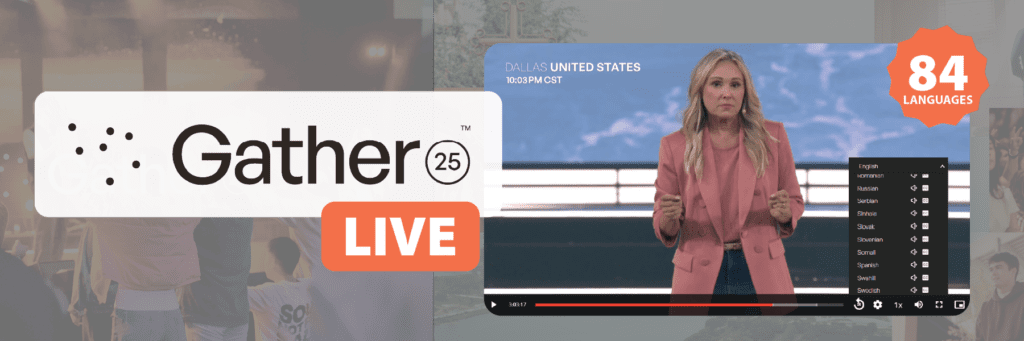
Gather25, hosted by IF:Gathering, was a groundbreaking 25-hour global broadcast connecting audiences across every continent. With over 1.25 million online viewers and participation from more than 21,000 Gather Groups worldwide, the event aimed to inspire and unite the global church community.
Aberdeen Broadcast Services has partnered with IF:Gathering since 2020, providing both live captioning for streaming events and post-produced captioning for archived content. Gather25 marked an ambitious new chapter in that partnership—the first time Aberdeen was brought on to help scale the event’s global reach through real-time translation.
As far as we know, this was a first-of-its-kind undertaking: a multilingual livestream of this magnitude, requiring impeccable coordination across dozens of languages and platforms. Aberdeen was one of several trusted vendors, working alongside the technology and broadcast partners hired for the event to make it all possible.
The Challenge: Delivering 25 Hours of Multilingual, Real-Time Access
Supporting a continuous, multilingual broadcast of this scale introduced several technical challenges:
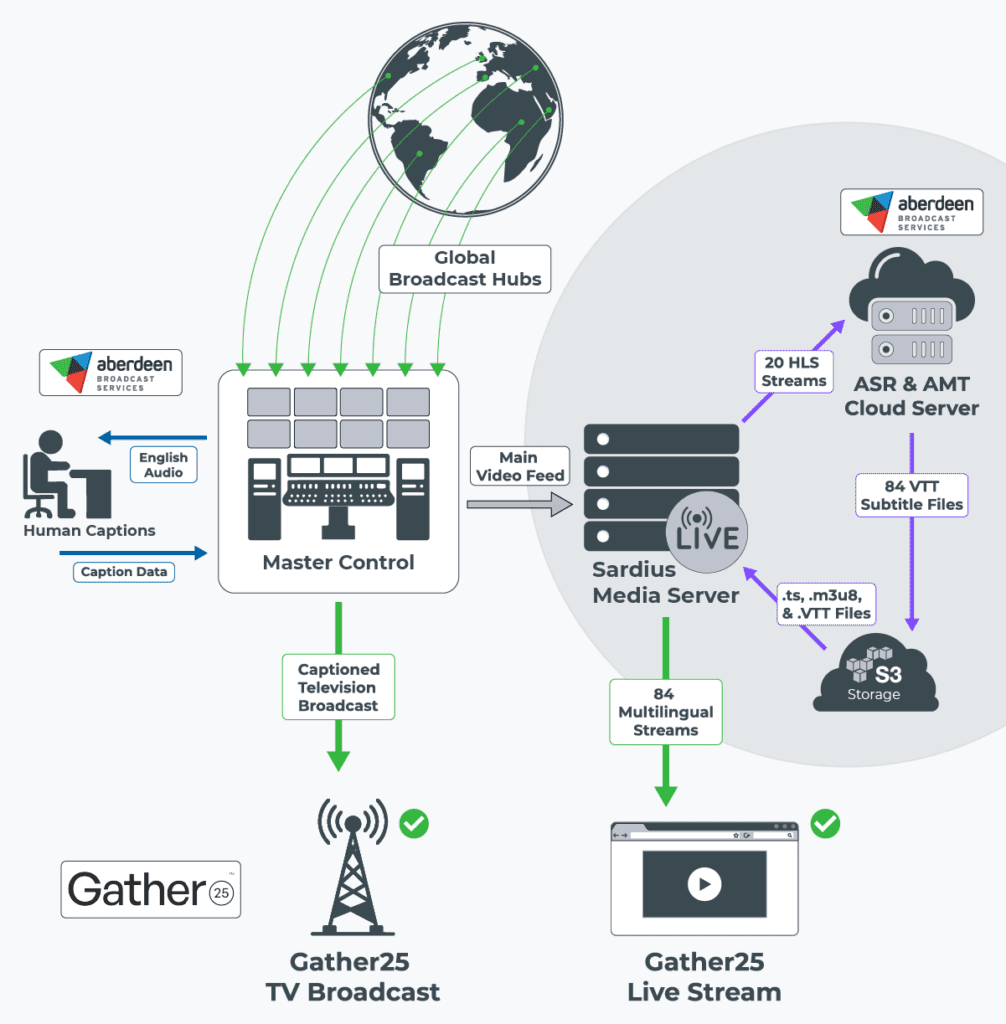
Maintain uninterrupted captioning across a 25-hour live stream spanning 7 global broadcast hubs.
Generate real-time captions and translations for 84 language streams with high accuracy and minimal latency.
Implement a dynamic captioning system that allows viewers to pause, rewind, and review up to four hours of content during the live event ("rolling DVR" functionality).
Collaborate across multiple teams — Element Media Group (master control), Sardius (video player delivery), SyncWords (captioning/subtitle platform), and Interprefy (live interpreters) — to ensure flawless live execution.
Deliver caption files in a continuous VTT format, dynamically updating during the broadcast to support both live viewing and post-event on-demand access.
The Solution: Continuous Live Captioning and Translation Across 84 Languages
Before the event went live, a workflow that could support uninterrupted, real-time captioning and translation across dozens of simultaneous streams needed to be built. This required deep coordination with multiple teams to align audio sources, language feeds, and delivery endpoints. Our goal was to ensure every segment of the broadcast could be accurately captioned and translated with minimal manual intervention once the event began.
A key technology partner behind this workflow was SyncWords, whose platform Aberdeen leverages to manage real-time captioning and translation delivery. SyncWords played a vital behind-the-scenes role in not only powering the infrastructure we used to deploy captions across dozens of streams but also collaborating directly with engineers at Sardius and Elemental Media to implement specialized audio-isolation coding for the event. This coordination ensured that every audio feed we received was optimized for clean, accurate transcription and translation at scale.
Pre-Event Testing
To guarantee performance, Aberdeen conducted over 50 hours of pre-event testing, stress-testing multi-language streams, and simulating 25-hour sessions to ensure system endurance. A key priority was ensuring that VTT caption files would function as continuously updated feeds, rather than static uploads. This real-time updating was essential for Sardius’ platform to support both live captions and rolling DVR features, while also allowing seamless access to captions during on-demand playback after the event.
Streaming Caption Workflow
In a typical video workflow, captions are created after recording, uploaded separately, and synced to on-demand content. For Gather25’s livestream, captions had to be generated and delivered in real time, alongside the video stream.
The system worked like this:
Live video was broken into segments (HLS .ts files) and stored in an S3 bucket, alongside a .m3u8 manifest file managing playback.
Simultaneously, a VTT subtitle file was created and appended in real time—each new caption line was added to the file without restarting it.
This continuous file structure allowed Sardius’ player to provide viewers with immediate access to live captions while also enabling DVR controls—viewers could rewind up to four hours and then return to the live stream without losing their place.
Once the event ended, these same VTT files remained attached to the recorded content for full accessibility during on-demand viewing.
This architecture required precise timing, structured file delivery, and full alignment with Sardius’ streaming infrastructure.
What's an HLS Stream?
An HLS stream (HTTP Live Streaming) delivers video content over the internet in small, manageable chunks. The video is split into short segments (usually 2–10 seconds long) and saved as .ts (transport stream) files. A playlist file (called a .m3u8) tells the video player what order to play those chunks in. As a viewer watches, their device downloads and plays the segments one at a time, allowing smooth playback, even with slow or fluctuating internet.
Workflow Optimization
Aberdeen’s team engineered a sophisticated workflow to process 20 incoming HLS feeds. Working closely with Element Media Group, which managed master control and delivered stripped audio to Sardius, Aberdeen received feeds prepped for accessibility:
Speech-Only Audio Extraction: Each of the 20 HLS streams included up to 16 audio tracks; Aberdeen pulled content from Track 16, where music had been removed to isolate spoken word, ensuring clean inputs for accurate captioning and translation.
Language Processing:
Live English captioning was performed by Aberdeen’s professional human captioners via a broadcast encoder at Master Control, ensuring exceptional accuracy of the English captions for the television broadcast.
Translated English to Kinyarwanda, a language not supported by any of the major ASR engines, demonstrating a custom solution beyond standard automation.
Created native-language captions for 14 non-English spoken feeds, including Arabic, Mandarin, French, German, Portuguese, and more.
Translated stripped English audio into 68 other languages, selecting the best available machine translation engine per language (prioritizing: DeepL > OpenAI > Amazon > Google > Azure).
File Management: All caption files were delivered to Sardius using clearly labeled S3 bucket destinations (e.g., EN for English, ES for Spanish), with structured naming conventions to ensure accurate mapping during the live event and in the post-event archive.
Impact: Real-Time Engagement and Global Reach Through Accessibility
Gather25’s accessibility efforts produced measurable results:
Over 1 million minutes of English captions and translations were viewed during the live stream, equal to nearly 17,000 hours of real-time engagement.
Continuous, real-time VTT streaming ensured seamless live accessibility, enabled four-hour rolling DVR, and extended caption access post-event.
Aberdeen's workflow operated without any critical interruptions across the entire 25-hour window, validating the strength of its testing protocols and system reliability.
By combining AI-driven automation, human captioning expertise, and a deep integration with broadcast systems, Aberdeen Broadcast Services delivered scalable, high-quality accessibility at a truly global level.
Conclusion: Advancing Live Event Accessibility on a Global Scale
Gather25’s mission to unite believers around the world was made stronger through its commitment to accessibility. With real-time captioning and translation across 84 language streams, Aberdeen Broadcast Services helped make this global event inclusive, impactful, and available to all.
For organizations planning large-scale, multilingual broadcasts, Aberdeen’s tested and proven solutions offer the reliability and scalability needed to reach a worldwide audience.
Let’s talk about how we can support your next event.Contact us to learn more.
Closed captioning serves as a powerful tool that extends its impact far beyond aiding the deaf and hard-of-hearing community. Its significance transcends age, abilities, and background, making it an invaluable resource for both educators and learners. In the digital age, closed captioning has emerged as a transformative resource, with research revealing that students, English language learners, and children with learning disabilities who watch programs with closed captioning turned on improve their reading skills, increase their vocabulary, and enhance their focus and attention.
The scholarly article, Closed Captioning Matters: Examining the Value of Closed Captions for All Students (Smith 231) states that “Previous research shows that closed captioning can benefit many kinds of learners. In addition to students with hearing impairments, captions stand to benefit visual learners, non-native English learners, and students who happen to be in loud or otherwise distracting environments. In remedial reading classes, closed captioning improved students’ vocabulary, reading comprehension, word analysis skills, and motivation to learn (Goldman & Goldman, 1988). The performance of foreign language learners increased when captioning was provided (Winke, Gass, & Sydorenko, 2010). Following exams, these learners indicated that captions lead to increased attention, improved language processing, the reinforcement of previous knowledge, and deeper understanding of the language. For low-performing students in science classrooms, technology-enhanced videos with closed captioning contributed to post-treatment scores that were similar to higher-performing students (Marino, Coyne, & Dunn, 2010). The current findings support previous research and highlight the suitability of closed-captioned content for students with and without disabilities.”
Reading Rockets, a national public media literacy initiative provides resources and information on how young children learn and how educators can improve their students’ reading abilities. In the article, Captioning to Support Literacy, Alise Brann confirms that “Captions can provide struggling readers with additional print exposure, improving foundational reading skills.”
She states, “In a typical classroom, a teacher may find many students who are struggling readers, whether they are beginning readers, students with language-based learning disabilities, or English Language Learners (ELLs). One motivating, engaging, and inexpensive way to help build the foundational reading skills of students is through the use of closed-captioned and subtitled television shows and movies. These can help boost foundational reading skills, such as phonics, word recognition, and fluency, for a number of students.”
Research clearly demonstrates that “people learn better and comprehend more when words and pictures are presented together. The combination of aural and visual input gives viewers the opportunity to comprehend information through different channels and make connections between them” (The Effects of Captions on EFL Learners’ Comprehension of English-Language Television Programs).
From bolstering reading skills, to enhancing focus and language comprehension, the benefits of closed captioning are numerous. We at Aberdeen Broadcast Services are committed to providing quality closed captions for television (TV) and educational programming.
Here is the public service announcement (PSA) we released in 2016 on local broadcast stations, emphasizing how closed captioning can enhance children's literacy skills.
Been tasked with figuring out how to implement closed captions in your video library? The process can be overwhelming at first. While evaluating closed captioning vendors, it’s good to understand the benefits of captioning, who your audience is, what to consider when it comes to quality, and what to expect from a vendor.
There are several things that an organization should consider and evaluate before choosing a closed captioning vendor. Some of the most important factors include:
Benefits of Closed Captioning
Accessibility: First, and most importantly, closed captioning makes videos more accessible to people with hearing impairments. This can help to level the playing field and ensure that all viewers have the opportunity to enjoy the content.
Non-native English speakers: Closed captioning can be helpful for non-native English speakers. It can help them to understand the content of videos even if they are not fluent in English.
People in noisy environments: Closed captioning can be helpful for people who are in noisy environments. It allows them to watch videos without having to worry about missing any of the audio.
Engagement: Closed captioning can help to keep viewers engaged in videos. When viewers can read along with the audio, they are more likely to stay focused and understand the content.
Comprehension: Closed captioning can help viewers to better understand the content of videos. When viewers can see the words that are being spoken, they are better able to process the information and remember it.
SEO: Closed captions can help to improve the search engine optimization (SEO) of videos. This is because search engines can read the text of captions, which can help to improve the ranking of videos in search results.
Overall, closed captioning is a valuable tool that can benefit a wide range of audiences. It makes videos more accessible, engaging, and comprehensible for everyone.
Evaluating Vendors
By considering these factors, organizations can choose a closed captioning vendor that will meet their needs and provide a high-quality service:
Accuracy: The captions should be accurate and error-free. This is important for all viewers, but it is especially important for people with hearing impairments.
Timeliness: The captions should be delivered on time. This is important for live events, as well as for pre-recorded videos that are being released on a tight schedule.
Format: The captions should be delivered in a format that is compatible with the organization's equipment. This may include closed captions for live events, or subtitles for pre-recorded videos.
Cost: The cost of closed captioning services varies depending on a number of factors, including the length of the video, the number of viewers, and the turnaround time required.
What to Expect in the Process
Start early: Closed captioning can take time, so it is important to start the process early. This will help to ensure that the captions are accurate and delivered on time.
Test the captions: Once the captions are complete, it is important to test them to make sure that they are accurate and error-free. This can be done by having a few people watch the video with the captions turned on.
Provide feedback: If there are any errors in the captions, or if the captions are not formatted correctly, it is important to provide feedback to the closed captioning vendor. This will help to ensure that the captions are of the highest quality.
Use these tips when evaluating closed captioning vendors and you’ll ensure that their videos are accessible to everyone and that they provide a positive viewing experience for all viewers.
On October 11, 2022, the Federal Communications Commission (FCC) released the latest CVAA biennial report to Congress, evaluating the current industry compliance as it pertains to Sections 255, 716, and 718 of the Communications Act of 1934. The biennial report is required by the 21st Century Communications and Video Accessibility Act (CVAA), which amended the Communications Act of 1934 to include updated requirements for ensuring the accessibility of "modern" telecommunications to people with disabilities.
FCC rules under Section 255 of the Communications Act require telecommunications equipment manufacturers and service providers to make their products and services accessible to people with disabilities. If such access is not readily achievable, manufacturers and service providers must make their devices and services compatible with third-party applications, peripheral devices, software, hardware, or consumer premises equipment commonly used by people with disabilities.
Accessibility Barriers
Despite major design improvements over the past two years, the report reveals that accessibility gaps still persist and that industry commenters are most concerned about equal access on video conferencing platforms. The COVID-19 pandemic has highlighted the importance of accessible video conferencing services for people with disabilities.
Zoom, BlueJeans, FaceTime, and Microsoft Teams have introduced a variety of accessibility feature enhancements, including screenreader support, customizable chat features, multi-pinning features, and “spotlighting” so that all participants know who is speaking. However, commentators have expressed concern over screen share and chat feature compatibility with screenreaders along with the platforms’ synchronous automatic captioning features.
Although many video conferencing platforms now offer meeting organizers synchronous automatic captioning to accommodate deaf and hard-of-hearing participants, the Deaf and Hard of Hearing Consumer Advocacy (DHH CAO) pointed out that automated captioning sometimes produces incomplete or delayed transcriptions and even if slight delays of live captions cannot be avoided, these captioning delays may cause “cognitive overload.” Comprehension can be further hindered if a person who is deaf or hard of hearing cannot see the faces of speaking participants, for “people with hearing loss rely more on nonverbal information than their peers, and if a person misses a visual cue, they may fall behind in the conversation.”
Automated vs. Human-generated Captions
At present, the automated captioning features on these conference platforms have an error rate of 5-10%. That’s 5-10 errors per 100 words spoken and when the average conversation rate of an English speaker is 150 words per minute, you’re looking at the possibility of over a dozen errors a minute.
Earlier this year, our team put Adobe’s artificial intelligence (AI) powered speech-to-text engine to the test. We tasked our most experienced Caption Editor with using Adobe’s auto-generated transcript to create & edit the captions to meet the quality standards of the FCC and the deaf and hard of hearing community on two types of video clips: a single-speaker program and one with multiple speakers.
Open captions and closed captions are both used to provide text-based representations of spoken dialogue or audio content in videos, but they differ in their visibility and accessibility options.
Here's the difference between closed and open captions:
Open Captions
Open captions, also known as "burned-in" or "hardcoded" captions, are permanently embedded in the video itself.
They are visible to all viewers and cannot be turned off or disabled.
Open captions are typically added during the video production process and become a permanent part of the visual content.
They are useful when the video is intended for a wide audience, including individuals who are deaf or hard of hearing, or when the video will be played in noisy environments where audio may not be easily heard (e.g. a museum).
Closed Captions
Closed captions are separate text tracks that can be turned on or off by the viewer.
They are not visible by default but can be enabled through the video player's settings or options.
Closed captions provide flexibility for viewers who may not need or want the captions.
They are commonly used in broadcast television, streaming platforms, and online videos to cater to diverse audiences and comply with accessibility regulations.
Closed captions can be generated in real-time using a live writer or automatic speech recognition (ASR) technology or added manually during post-production.
Feature
Open Caption
Closed Captions
Visibility
Permanently embedded in the video
Separate text track that can be turned on or off
Accessibility
Cannot be turned off
Can be turned on or off by the viewer
Applications
Wide audiences, noisy environments
Diverse audiences, compliance with accessibility regulations
Creation
Added during video production
Generated in real-time or embedded manually during post-production or uploaded as a sidecar file
Both open and closed captions serve the purpose of making videos accessible to individuals who are deaf or hard of hearing, those who are learning a new language, or those who prefer to read the text alongside the audio.
The choice between open or closed captions depends on the specific requirements and preferences of the content creators and the target audience.
In the July ‘21 release of Premiere Pro, Adobe introduced its artificial intelligence (AI) powered speech-to-text engine to help creators make their content more accessible to their audiences. Their extensive toolset allows their users to edit, stylize, and export captions in all supported formats straight out of the sequence timeline of a Premiere Pro project. A 3-step process of auto-transcribing, generating, and stylizing captions all within the platform already familiar to its users delivers a seamless experience from beginning to end. But how accurate is the final product?
This blog article was published in March 2022, and since then, ASR (Automatic Speech Recognition) technology has advanced significantly. While AI-powered ASR still does not outperform human writers — which we firmly consider the gold standard — these advancements have been so substantial and continue to improve. This progress gives us the confidence to use ASR as a budget-friendly alternative for specific applications.
Today, at their best, AI captions have an error rate of 5-10% - much improved over the 80% accuracy we saw just a few years ago. High accuracy is crucial for the deaf and hard-of-hearing audience as each error adds to the possibility of confusing the message. To protect all audiences that rely on captioning to understand television programming, the Federal Communications Commission (FCC) set a detailed list of quality standards that all captions must meet to be acceptable for broadcast back in 2015. Preceding those standards, the Described and Captioned Media Program (DCMP) published its Captioning Key manual over 20 years ago and has since been a valuable reference for captioning of both entertainment and educational media targeted to audiences of all age groups. Simply having captions present on your content isn’t enough, it needs to be accurate and best replicate the experience for all audiences.
Adobe’s speech-to-text engine has been one of the most impressive that our team has seen to date, so we decided to take a deeper look at it and run some tests. We tasked our most experienced Caption Editor with using Adobe’s auto-generated transcript to create & edit the captions to meet the quality standards of the FCC and the deaf and hard of hearing community on two types of video clips: a single-speaker program and one with multiple speakers. Our editor used our Pop-on Plus+ caption product for these examples, which are our middle-tier quality captions that fulfill all quality standard requirements but are not always 100% free of errors.
Did using Adobe’s speech-to-text save time, or did it create more work in the editing process than needed? Here’s how it went…
In-depth comparison documents that evaluate the captions cell-by-cell are available for download here:
In this example, we used the perfect scenario for AI: clear audio, a single speaker at an optimal words-per-minute (WPM) speaking rate, and no sound effects or music.
The captions contained the following issues that would need to be corrected by the Caption Editor:
No speaker ID.
Strange leading spaces before the second caption line - Caption Editor can delete easily in their software.
A total of 10 cells out of 95 were formatted the way our Caption Editor did it and would have required no further attention at all.
Several first words were not capitalized.
Some sentences had end-sentence punctuation in the middle of a sentence.
Many words were wrong.
Most cells formatted poorly, resulting in cells with 2-3 words, or cells that were difficult to read.
Many of these cells can be optimized and lines combined for ease of reading.
Several cells with a duration of less than 1 second.
Here’s the clip with Adobe’s speech-to-text captions overlayed on the top half of the video, and ours on the bottom half.
Multiple Speaker Clip
For the next clip, we went with a more realistic example of television programming where there are multiple speakers, an area where AI is known to struggle and has difficulties identifying the speakers. This clip also features someone with a pronounced accent, commentators speaking over one another, and proper names of athletes – all of which our editors take the time to research and understand.
The same errors detailed in the single-speaker example are present throughout, among the other difficulties we expected it to have. In fact, there were so many errors that our editor was unable to use the transcript from Adobe and started from the beginning using our own workflow.
Here’s a sample of the first 9 cells of captions with what Adobe transcribes in the first column, notes from our Caption Editor, and how it should look.
Adobe’s Automated SRT Caption File
Issue
Formatted by Aberdeen
something you are never seen in your life, correct?
No speaker ID.
(Pedro Martinez) It's something you have never seen in your life,
“Correct” is spoken by new speaker.
(Matt Vasgersian) Correct!
So it's.
Missing text.
So it's--so it's MVP of the year!
So we're all watching something different. OK
(Pedro) We're all watching something different.
He gets the MVP.
Okay, he gets the MVP.
I'd be better off.
Completely misunderstood music lyrics.
♪ Happy birthday to you ♪
Oh, you, you guys.
(Matt) You guys.
Let me up here to dove into the opening night against the Hall of Fame.
Merged multiple sentences together.
Just left me up here to die.
You left me up here to die against the hall of famer.
Take a look at the clip. Again, with Adobe's speech-to-text on the top and Aberdeen on the bottom.
In-depth comparison documents that evaluate the captions cell-by-cell are available for download here:
Overall, the quality of the auto-generated captions exceeded expectations, and we found them to be in the top tier of speech-recognition engines available. The timing and punctuation were particularly impressive. However, when doing a true comparison to the captioning work that we would consider acceptable, AI does not meet Aberdeen’s broadcast quality standard.
Aberdeen's post-production Caption Editors are detail-oriented and grammar-savvy and always strive to portray every element of the program with 100% accuracy so that the viewer misses nothing. For our most experienced Caption Editor, it took a 5:1 ratio in time for them to edit and correct the single-speaker clip; meaning, for every minute of video, it took 5 minutes to clean up the transcript and captions. Assuming your team is educated in the proper timing of caption cells, line breaks, and grammar, a 30-minute program may take over 2.5 hours to bring up to standards with a usable transcript. In the second example, the transcript was unusable and would have taken more time to clean up than it did to transcribe from scratch. Double that timeline now.
Consider all of the above when using this service. Do you have the time and resources to train your staff to know how to edit auto-generated captions and get them up to the appropriate standards? How challenging may your content be for the AI? Whenever and however you make the choice, make sure you deliver the best possible experience to your entire audience.
Closed captioning is an essential aspect of modern media consumption, bridging the gap of accessibility and inclusivity for diverse audiences. Yet, despite its widespread use, misconceptions about closed captioning persist. In this article, we delve into the most prevalent myths surrounding this invaluable feature, shedding light on the truth behind closed captioning's capabilities, impact, and indispensable role in enhancing the way we interact with video content.
Let’s debunk these common misunderstandings about closed captioning and gain a fresh perspective on the far-reaching importance of closed captioning in today's digital landscape.
Closed captioning is only for the deaf and hard of hearing
While closed captions are crucial for people with hearing impairments, they benefit a much broader audience. They are also helpful for people learning a new language, those in noisy environments, individuals with attention or cognitive challenges, and viewers who prefer to watch videos silently.
Closed captioning is automatic and 100% accurate
While there are automatic captioning tools, they are not always accurate, especially with complex content, background noise, or accents. Human involvement is often necessary to ensure high-quality and accurate captions.
Captions are always displayed at the same place on the screen
Some formats, like SCC, support positioning and allow captions to appear in different locations. However, most platforms use standard positioning at the bottom of the screen.
Captions can be added to videos as a separate file later
While it's possible to add closed captions after video production, it's more efficient and cost-effective to incorporate captioning during the production process. Integrating captions during editing ensures a seamless viewing experience.
Captions are only available for movies and TV shows
Closed captioning is essential for television and films, but it's also used in various other video content, including online videos, educational videos, social media clips, webinars, and live streams.
Captioning is a one-size-fits-all solution
Different platforms and devices may have varying requirements for closed caption formats and display styles. To ensure accessibility and optimal viewing experience, captions may need adjustments based on the target platform.
All countries have the same closed captioning standards
Captioning standards and regulations vary between countries, and it's essential to comply with the specific accessibility laws and guidelines of the target audience's location.
Closed captioning is expensive and time-consuming
While manual captioning can be time-consuming, there are cost-effective solutions available, including automatic captioning and professional captioning services. Moreover, the benefits of accessibility and broader audience reach often outweigh the investment.
In summary, closed captioning is a vital tool for enhancing accessibility and user experience in videos. Understanding the realities of closed captioning helps ensure that content creators and distributors make informed decisions to improve inclusivity and reach a broader audience.
In the history of our planet, littering is a relatively new problem. It was around the 1950s when manufacturers began producing a higher volume of litter-creating material, such as disposable products and packaging made with plastic. Much like the boom of manufacturers creating more disposable packaging, new video content is being pushed out to streaming platforms in incredible volumes every day.
Along with all this new video content, there are noticeable similarities between littering and a prevalent problem in our industry: inaccessible media – specifically poor captioning quality. Instead of it being food wrappers, water bottles, plastic bags, or cigarette butts, it’s misspellings, lack of punctuation, missing words, or the wrong reading rate (words-per-minute on the screen) that affects readability.
The motives behind littering and choosing poor-quality captioning are similar and it generally boils down to one of the following reasons: laziness or carelessness, lenient law enforcement, and/or presence of litter already in the area. Both are very selfish acts, allowing one person to take the easy route by just discarding their trash wherever they please, or in the case of captioning, choosing the quickest & cheapest option available to fulfill a request without any regard to the quality. When it comes to organizations enforcing the guidelines and standards, if their efforts are relaxed, it will encourage a lot of people to not follow them. And the presence of other content creators getting away with inaccessible media will, no doubt, encourage others to take the same route.
In The Big Hack’s survey of over 3,000 disabled viewers, four in five disabled people experience accessibility issues with video-on-demand services. “66% of users feel either frustrated, let down, excluded or upset by inaccessible entertainment.” In fact, “20% of disabled people have canceled a streaming service subscription because of accessibility issues.” It’s clear: inaccessible media is polluting video content libraries.
Viewers that do not utilize closed captions may not always think about how poor-quality captions affect the users that do, just like the consequences of littering on the community and animals that all share the Earth’s ecosystem are often overlooked. Education and awareness are important tools in reducing the problem. If we allow it to become commonplace, much like litter, bad captioning will wash away into the “ocean” of online video content and become permanent pollution our video “eco-system.”
So, what can we do about it before it’s too late? Much like with littering, we can start with community cleanups. Let the content creators know that you value captioning and would enjoy their content more if captions were present and accurately represent the program to all viewers. Find their websites and social media pages and contact them – make them aware. And if it’s on broadcast television, let the FCC know.
Clean communities have a better chance of attracting new business, residents, and tourists – the same will go for the online video community. Quality captioning is your choice and, for the sake of the video community, please evaluate the quality of work done by the captioning vendors that you’re considering and don’t always just go for the cheapest and quickest option. Help keep the video community clean.